Is Claude down, or did you hit your usage limit?
A usage limit names the limit and its reset time; an outage or overload doesn't. How to tell them apart, where to check Claude's status, what to do next.
Read the message. A usage limit always names the limit and when it resets, such as "5-hour limit reached - resets [time].", while a capacity problem says "Due to unexpected capacity constraints, Claude is unable to respond to your message. Please try again soon." Confirmed incidents and outages are listed on status.claude.com. If the message names a reset time, waiting (or usage credits) is the fix; if it doesn't, retry in a few minutes and check the status page.
What does a usage limit look like?
These are the limit messages Anthropic documents, word for word:
| Where | Message |
|---|---|
| claude.ai | Approaching 5-hour limit. |
| claude.ai | 5-hour limit reached - resets [time]. |
| claude.ai | 5-hour limit resets [time] - continuing with usage credits. |
| Claude Code | You've hit your session limit · resets 3:45pm |
| Claude Code | You've hit your weekly limit · resets Mon 12:00am |
| Claude Code | You've hit your Opus limit · resets 3:45pm |
Sources: Troubleshoot Claude error messages and Claude Code errors; the times in the Claude Code rows are the docs' examples.
Each of them tells you which limit stopped you and when it comes back. Several limits can do it on their own, so check which one is full.
The session, the week and a model's own limit can each block you
Example: session 100%, week 63%, Opus 40%. Whichever fills first stops you.
Blockedevery model waits for the session reset.
| Limit | Used | Resets |
|---|---|---|
| 5-hour session | 100% | — |
| Weekly · all models | 63% | — |
| Weekly · Opus only | 40% | — |

What does a Claude outage or overload look like?
Anthropic documents one capacity message: "Due to unexpected capacity constraints, Claude is unable to respond to your message. Please try again soon." It describes it as high demand across the system and temporary load management, not an outage, and says to retry in a few minutes (Troubleshoot Claude error messages).
A generic error with no reset time, or a sign-in that fails for no reason, also points to a service problem rather than your limit. For sign-in errors, Anthropic suggests turning off your VPN and browser extensions, clearing the cache and cookies, and checking status.claude.com for incidents.
Where can I check if Claude is down?
- status.claude.com: Anthropic's status page, where confirmed service incidents and outages are posted.
- Settings > Usage on claude.ai: if your Current session and Weekly limits are far from full, your limit is not what stopped you.
- Claude Code:
/usageshows your plan's usage limits, so you can rule the limit in or out from the terminal (Claude Code commands).
What should I do in each case?
| What you see | What it means | What to do |
|---|---|---|
| A limit message with a reset time | That limit is full | Wait for the reset, turn on usage credits, or use a limit reset if you have one |
| The capacity message | Temporary load | Retry in a few minutes |
| A generic error, no reset time | Possible incident | Check status.claude.com, retry later |
| Claude Code at a limit | That limit is full | Leave the session open: it can continue automatically at the reset |
Claude Code's automatic continue needs version 2.1.234 or later and a claude.ai subscription; you can turn it off in /config (Interactive mode). Limit resets, when Anthropic gives one, are in Settings > Usage under Reset for free (What is a limit reset?).
When the five-hour session is full, it comes back about five hours after the message that opened it
Example: first message at 09:00 → reset at 14:00. The next message, at 14:00, opens a new window.
| Period | From | To |
|---|---|---|
| Window 1 | 09:00 | 14:00 |
| Window 2 | 14:00 | 19:00 |

Can I keep working when my limit is reached?
On Pro, Max 5x and Max 20x, usage credits let you keep working after an included limit, billed at standard API rates and separately from the subscription. You turn them on in Settings > Usage > Usage credits, with a monthly spend limit, and they apply to chat and Claude Code alike (Manage usage credits). The five-hour session still resets on its own schedule.
The weekly limit comes back at a fixed time each week assigned to your account, shown in Settings > Usage (What is the Pro plan?). To work out when your five-hour limit comes back, try the reset time calculator.
The weekly limit comes back at its fixed weekly reset, whatever the day you started
Example: 100% of the weekly limit used on day 5 of 7. The dashed line is a steady pace to the reset (Thu 18:00).
- Your usage
- Steady pace
Limit reachednothing runs until the reset (Thu 18:00).
| Measure | Value |
|---|---|
| Used so far | 100% |
| Days elapsed | 5 / 7 |
| Steady pace today | 71% |
| At the reset, at this rate | 100% |
| Weekly reset | Thu 18:00 |

How UsageMeter tells an incident from your limit
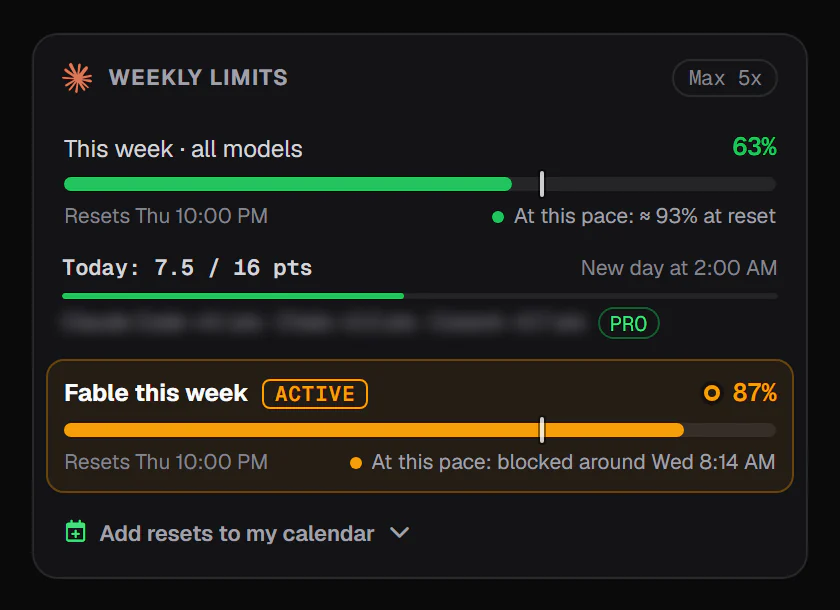
UsageMeter, our extension for Chrome, Edge and Firefox, shows every limit claude.ai reports for your account, with its reset time. Since version 1.6, when Claude itself is down or overloaded, the popup and a pill under the claude.ai message box say so, "Incident at Claude, not your limit", with a link to the status page. If a limit is what stopped you, the gauge is at 100 % and the reset time is right there.
FAQ
Why does Claude say it's at capacity when I still have usage left?
The capacity message isn't about your limit. Anthropic describes it as temporary load management during high demand across the system, not an outage. Your usage is unaffected; retry in a few minutes. Your limits and their reset times are in Settings > Usage.
How do I know if Claude is down right now?
Check status.claude.com, Anthropic's status page for confirmed incidents and outages. If the page shows no incident and your limits in Settings > Usage are far from full, the problem may be local: try another browser, turn off a VPN or extensions, or clear the cache.
Does an outage use up my Claude limit?
Anthropic doesn't publish a rule about usage during incidents. What counts toward your limits is what Claude processes: the length of your messages and conversation, attachments, the model, effort and tools. Watching your gauges before and after a failed reply shows whether it moved.
Is Claude Code down, or did I hit my limit?
Claude Code names the limit and the reset time when you hit one, for example "You've hit your weekly limit · resets Mon 12:00am". Without such a message, check status.claude.com. /usage shows how much of your session and weekly limits you have used.
Sources
- Troubleshoot Claude error messages, Anthropic help center, checked 24 September 2026
- What is a limit reset?, Anthropic help center, checked 24 September 2026
- Manage usage credits for paid Claude plans, Anthropic help center, checked 24 September 2026
- What is the Pro plan?, Anthropic help center, checked 24 September 2026
- Errors: usage limits, Claude Code docs, checked 24 September 2026
- Interactive mode: wait for a usage limit to reset, Claude Code docs, checked 24 September 2026
- Commands, Claude Code docs, checked 24 September 2026
- Claude status, Anthropic, checked 24 September 2026
What changed
- 24 September 2026: first version.