Browser extension · Chrome · Edge · Firefox

Your Claude limits, finally visible.

UsageMeter shows your usage windows right on the page — 5-hour session, weekly and per-model — refreshed every 30 seconds. No more surprise limits mid-conversation.

Essential is free · No credit card

tracked windows
0
tracked windows
sec. refresh
0 s
sec. refresh
themes
0+
themes
languages
0
languages
UsageMeter
Demo
Session · 5 h42%
Weekly63%
Fable 5 · weekly87%
Next reset--:--:--

Illustrative data — your real numbers appear once installed.

Track your quotas where you work

ClaudeLIVE
ChatGPTNEW · BETA
GrokNEW · BETA

ChatGPT & Grok tracking is opt-in: off by default, enabled per provider.

Features

What the extension does. Really.

Real-time meters

Three quota windows — 5-hour session, weekly and per-model — refreshed every 30 seconds.

Built into the page

Unobtrusive gauges right inside the claude.ai interface. No extra tab, no external dashboard.

NEW · BETA

ChatGPT & Grok

New in v1.4.0: the same tracking for ChatGPT and Grok, opt-in. Enable or disable each provider anytime.

50+ themes

Make claude.ai yours: 12 free base themes, 50+ premium themes, gradients and backgrounds with Pro.

34 languages

The extension speaks your language — interface translated into 34 languages.

BETA

Windows companion

In beta: a desktop app that wraps Claude Desktop and brings themes, usage tracking and tools to it.

New

Claude Code in the dashboard

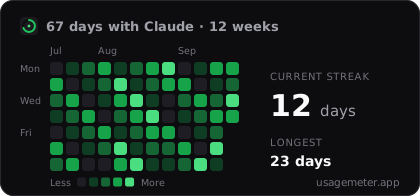
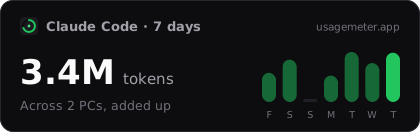
The UsageMeter Link companion app tracks your Claude Code tokens: multi-PC, history kept beyond 30 days, estimated cost.

Fable 5

Keep an eye on Fable 5, always.

The most advanced models get their own weekly usage window. UsageMeter tracks it separately and shows the exact countdown to the next reset — green, amber from 60%, red from 85%.

Fable 5 · weeklyDemo
72%
Resets in--:--:--
claude code
5-hour window · all devicesDemo
6.7M / ≈100M
opus4.1M62%
sonnet1.9M29%
haiku0.6M9%

Companion app

Your Claude Code usage, in the same dashboard

The terminal draws from the same quota as claude.ai — yet nothing shows it to you. UsageMeter Link reads your Claude Code transcripts locally and reports the totals, so you finally see the whole 5-hour window, model by model, across every machine.

  • Multi-PC: each machine shows up on its own, totals add up
  • History kept beyond Claude Code's 30-day local purge
  • Per-model breakdown and estimated API-equivalent cost
  • Local first: only token totals leave your machine, never your code
Get the appWindows · free · pair with a code

How it works

Three steps. Zero configuration.

01

Install the extension

From the Chrome Web Store or Firefox Add-ons. No setup required.

02

Open claude.ai

Your gauges appear right inside the interface, where you need them.

03

Keep the pace

Anticipate resets and adapt your usage — never lose a conversation to a surprise limit again.

Privacy

Your data stays with you.

Read the privacy policy
  • Usage tracking is computed locally, in your browser.
  • ChatGPT & Grok tracking is off by default — explicit opt-in, per provider.
  • Account is optional: sync only activates if you sign in.
  • No data selling. No ads in the extension.

Pricing

Simple, honest, in euros.

Essential

€0

forever

Pro

€3.99/mo

or €39.99/yr — €3.33/mo (−25%) · 7-day trial, cancel anytime

Team

€6.99/seat/mo

minimum 3 seats

60-day money-back guarantee

Compare plans

FAQ

Frequently asked questions

Yes. The Essential plan is free forever: live usage gauges, 12 themes, shortcuts, up to 3 accounts. Pro (€3.99/mo or €39.99/yr) adds premium themes, prediction charts and SmartQueue.

Take back control of your limits.

Install UsageMeter and always know where you stand — on Claude, ChatGPT and Grok.

Essential is free forever.