Reference
Claude usage tracker, plan by plan
In short
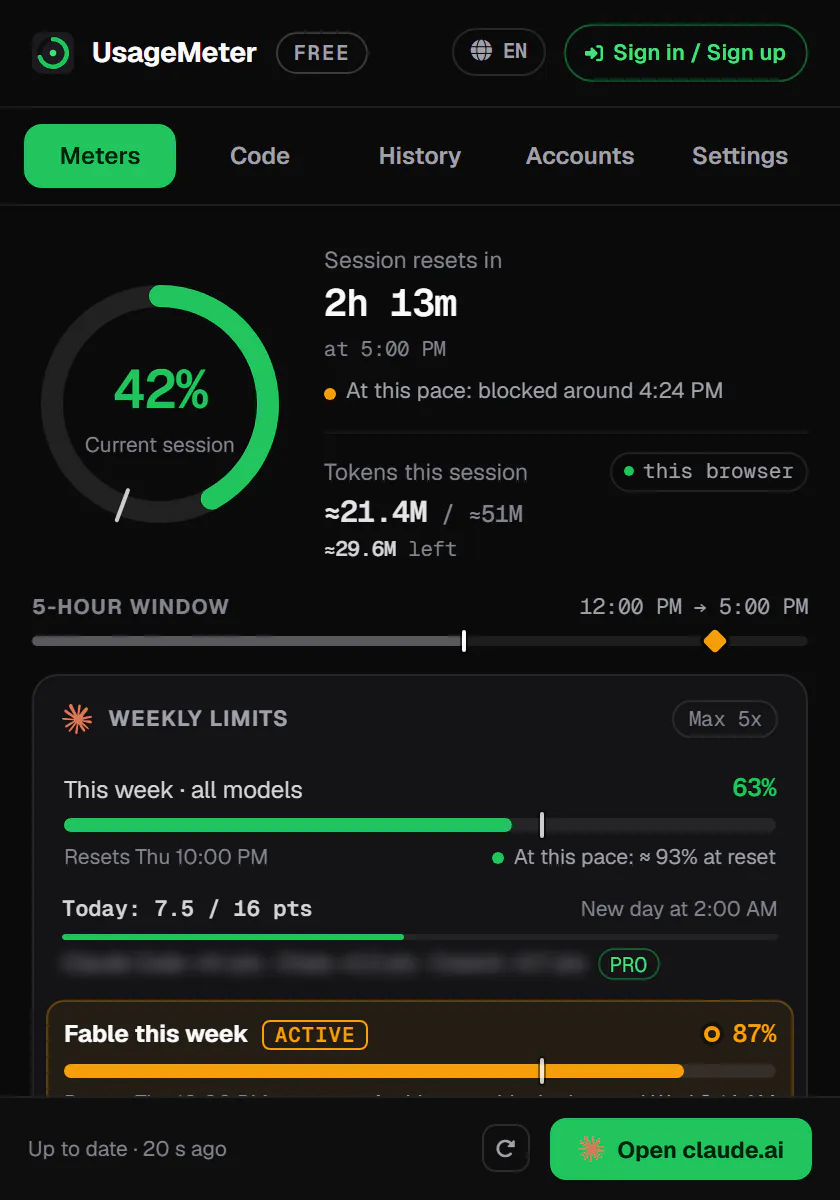
Claude shows your usage when you go and look, in Settings > Usage or with /usage in Claude Code, so a usage tracker is an extension or app that keeps those percentages and reset times in view while you work. UsageMeter is ours: a free extension for Chrome, Edge and Firefox that shows every limit claude.ai reports for your account, on the page and in the toolbar, with the countdown to each reset.
What UsageMeter shows, by Claude plan
What UsageMeter 1.6.0 (24 September 2026) shows for each kind of Claude account. It can only show what claude.ai reports for your account.
| Limit | Free | Pro | Max 5x · 20x | Team · Enterprise seats |
|---|---|---|---|---|
| 5-hour sessionWhat UsageMeter shows when claude.ai reports it. | Gauge from each reply's limits | Gauge, countdown and pace | Gauge, countdown and pace | Gauge, countdown and pace |
| Weekly limitWith the reset day and time, and whether you are on pace. | None to show | Gauge, reset time and pace | Gauge, reset time and pace | Gauge, reset time and pace |
| Model limits (Fable…)Every separate limit claude.ai reports for the account gets its own gauge. | None to show | Fable runs on credits: see the spend | Fable gauge with its reset | Each limit your seat reports |
| Usage creditsThis month's spend against your monthly cap. | Not on Free | Spend vs cap, auto-reload | Spend vs cap, auto-reload | When claude.ai reports them |
| Week by productHow much of the week went to chats, Claude Code and Cowork. | None to show | Chats, Claude Code, Cowork | Chats, Claude Code, Cowork | Chats, Claude Code, Cowork |
| Claude Code on several PCsUsageMeter Link, the free Windows app, adds up tokens from each PC. | No Claude Code on Free | Tokens from every PC (Windows) | Tokens from every PC (Windows) | Tokens from every PC (Windows) |
Sources for this table: Usage limit best practices · What is the Pro plan? · Claude Fable models on your plan · Manage usage credits for paid Claude plans · Manage costs effectively
Latest change
See all 11 changesMore usageIn effect
Opus 5.5 launch: five-hour limits raised on Pro, Max, Team and Enterprise seats
With Claude Opus 5.5, Anthropic increased the five-hour usage limits of Pro, Max, Team and seat-based Enterprise plans. The announcement gives no figure; Anthropic's Claude Code account put the increase at 20% for Claude Code's five-hour session limits.
Effect. Anthropic added that Opus 5.5, priced below Opus 5, goes 25% further within the five-hour and weekly limits. ZDNET reported the 20% for subscription plans in general.
- Pro
- Max 5x
- Max 20x
- Team
- Enterprise
- All of Claude
- 5-hour session
Sources: Anthropic · Anthropic (@claudeai) · Anthropic (@ClaudeDevs) · ZDNET (press)
Checked on 24 September 2026
Limit resetIn effect
One limit reset given to subscribers, to use whenever they choose
Pro, Max and Team subscribers can refill their five-hour session or weekly limit once with 'Reset for free' in Settings > Usage, on the web or in Claude Desktop (not in the mobile apps or Claude Code).
Effect. Anthropic said it can be applied any time until 22 October 2026; its help article adds that an unused reset expires on the day and time listed on the offer, in Settings > Usage.
- Pro
- Max 5x
- Max 20x
- Team
- All of Claude
- 5-hour session
- Weekly limit
Sources: Anthropic · Anthropic help centre · Anthropic (@ClaudeDevs) · MacRumors (press)
Checked on 24 September 2026
What a tracker can know, and what it cannot
A tracker can only show what Claude reports for your account. On paid plans that is a lot: Settings > Usage has the five-hour session and the time left in it, the weekly limit and its reset, a Fable ceiling when your plan has one, and your usage credits. What nobody can show you is a token allowance, because Anthropic does not publish one: limits are percentages of a budget that depends on your plan.
Three kinds of tools exist:
- Trackers that read claude.ai's own figures, like UsageMeter: the same percentages and reset times as Settings > Usage, kept on screen.
- Trackers that estimate usage by counting the tokens of your messages, files and history. They also work where Claude reports nothing, but their percentages are estimates.
- Claude Code tools that read the local history of one computer: tokens and API-price costs rather than your plan's limits. Anthropic's own
/usagebreakdown works the same way and "usage from other devices or claude.ai is not included".
On a Free account, Anthropic documents no usage bars: Settings > Usage progress bars are described for Pro, Max, Team and seat-based Enterprise plans. Some trackers read the figures Claude sends with each reply instead; since version 1.6.0 (24 September 2026) UsageMeter does too, so a Free account gets its gauges.
What UsageMeter shows
UsageMeter is the extension we build, independent and not affiliated with Anthropic. For free, it shows:
- a gauge for every limit claude.ai reports for your account: the five-hour session, the weekly limit shared by all models and products, and any separate weekly limit of a model (Fable) or product;
- the countdown to each reset, and your pace: on track, or when you would be blocked at your current pace ("blocked around 9:40 PM");
- under each reply on claude.ai, what it took from your session, and today's budget: what is left of your week, spread until the reset;
- all of it on the page (in the composer, or a ring under it; hover for every limit) and on the toolbar icon;
- the tokens of the current session, and how your week split between chats, Claude Code and Cowork;
- your usage credits: this month's spend against your monthly cap, and whether auto-reload is on;
- Claude Code on Windows, with UsageMeter Link: the tokens of each PC added up, and kept after Claude Code's 30-day local cleanup;
- up to three Claude accounts.
UsageMeter Pro adds alerts before the wall (at your threshold, when your pace would block you soon, at 100% and when a limit is back, never twice across your devices), charts (the current window projected to its reset, the last 24 hours, the last 7 days), 90 days of history and up to ten accounts. Prices are on the pricing page.
The weekly limit is shared by every Claude product, so the useful question is often where the week went. claude.ai reports that split, and UsageMeter draws it:
Where the week went: one weekly limit, shared by every product
Example: the week at 58% of the limit, day 4 of 7. The white marker is where a steady pace would be.
- Claude Code53%31 pts
- Chats33%19 pts
- Cowork14%8 pts
At this pacethe limit would be reached around day 6.9 of 7.
| Product | Share of the usage | Points of the limit |
|---|---|---|
| Claude Code | 53% | 31 |
| Chats | 33% | 19 |
| Cowork | 14% | 8 |
What UsageMeter reads, and what it never touches
UsageMeter reads usage percentages, reset times and token counts. It never reads, stores or sends your conversations. Your percentages, reset times and settings sync so the web dashboard, the Windows app and your other devices agree, attached to a random device ID until you create an account.
How it compares
Other good trackers exist, and some do things UsageMeter does not: the most installed one counts the tokens of each conversation and works on free accounts, two show Anthropic's peak hours, some notify you at thresholds you choose on the free tier. We compared seven of them, with what each does better, in Claude usage trackers compared.
FAQ
Does UsageMeter read my conversations?
No. It reads your usage percentages, reset times and token counts, the figures Claude already shows you in Settings > Usage. Conversations are never read, stored or sent.
Does a usage tracker work with a free Claude account?
Some do. Anthropic documents usage bars for paid plans only, so a tracker has to read the limits Claude sends with each reply, as UsageMeter does since version 1.6.0, or estimate usage from tokens.
Why do two trackers show different numbers?
Because they do not measure the same thing. Some read Claude's own percentages, some count tokens and estimate, and Claude Code tools only see the history of the computer they run on.
Can a tracker follow Claude Code?
Partly. claude.ai reports how much of your week went to Claude Code, and UsageMeter shows that split. For tokens, /usage only sees one computer; UsageMeter Link adds up the Claude Code tokens of each of your Windows PCs.
Is UsageMeter made by Anthropic?
No. UsageMeter is an independent tool, not affiliated with, endorsed or sponsored by Anthropic.
Sources
Anthropic's own pages first, then press coverage, each with its date.