Claude usage limit notifications: get warned in time
Claude warns near the 5-hour limit, Claude Code at 85 %. How to get a notification at your own threshold, from your pace, and when your limit is back.
Claude warns you once you get close: claude.ai shows "Approaching 5-hour limit." and Claude Code says "You've used 85% of your session limit" (Claude Code errors). Both appear inside the app while you use it. To be told earlier, at a threshold you choose or from your current pace, and to hear when a limit is back, you need a tool that watches your usage for you, such as UsageMeter.
What does Claude tell you before the limit?
These are the messages Anthropic documents, word for word:
| Where | Message | When |
|---|---|---|
| claude.ai | Approaching 5-hour limit. | Near the five-hour limit (the threshold isn't published) |
| claude.ai | 5-hour limit reached - resets [time]. | At the limit |
| claude.ai | 5-hour limit resets [time] - continuing with usage credits. | At the limit, with usage credits on |
| Claude Code | You've used 85% of your session limit · resets 3:45pm | At 85 % of the session |
| Claude Code | You've hit your weekly limit · resets Mon 12:00am | At the weekly limit |
Sources: Troubleshoot Claude error messages and Claude Code errors. Times in the Claude Code rows are the docs' examples.
Is there a warning for the weekly limit?
Claude Code tells you when the weekly limit is reached. Some accounts also see a pace verdict for the week in Settings > Usage ("Heads up. At this pace you'll run out…"), but the page differs between accounts and Anthropic's help center doesn't document that part. The documented page shows how much of your Current session and Weekly limits is used and when each resets (Usage limit best practices).
Remember that several limits can block you on their own: the five-hour session, the weekly limit shared by all models, and on some plans a limit of one model family (Claude usage limits).
Three limits, and any one of them can block you first
Example: session 42%, week 63%, Fable 87%. Whichever fills first stops you.
Closest limitthe Fable limit is at 87%: that is the one to watch.
| Limit | Used | Resets |
|---|---|---|
| 5-hour session | 42% | — |
| Weekly · all models | 63% | — |
| Weekly · Fable only | 87% | — |

Why a warning near 100 % often comes too late
A long conversation costs more with every reply, because the whole conversation is sent again. A few heavy replies late in a session can take you from "approaching" to "reached" before you finish what you were doing. The five-hour window also opens with your first message, so the moment you get blocked depends on when you started, not on the clock.
The five-hour window opens with your first message and resets about five hours later
Example: first message at 09:00 → reset at 14:00. The next message, at 14:00, opens a new window. At 12:40, 1 h 20 min are left.
| Period | From | To |
|---|---|---|
| Window 1 | 09:00 | 14:00 |
| Window 2 | 14:00 | 19:00 |

What helps is a warning that looks at your pace: not "you're close", but "at this rate you'll be blocked around 9:40 PM". That leaves time to finish, to switch to a lighter model, or to stop at a good point.
How to get a notification before the limit
UsageMeter, our browser extension for Chrome, Edge and Firefox, watches every limit claude.ai reports for your account:
- Free: a forecast in the popup and in the toolbar icon's tooltip, "At this pace: blocked around 9:40 PM", from your last 45 minutes (12 hours for the week), and a badge on the icon.
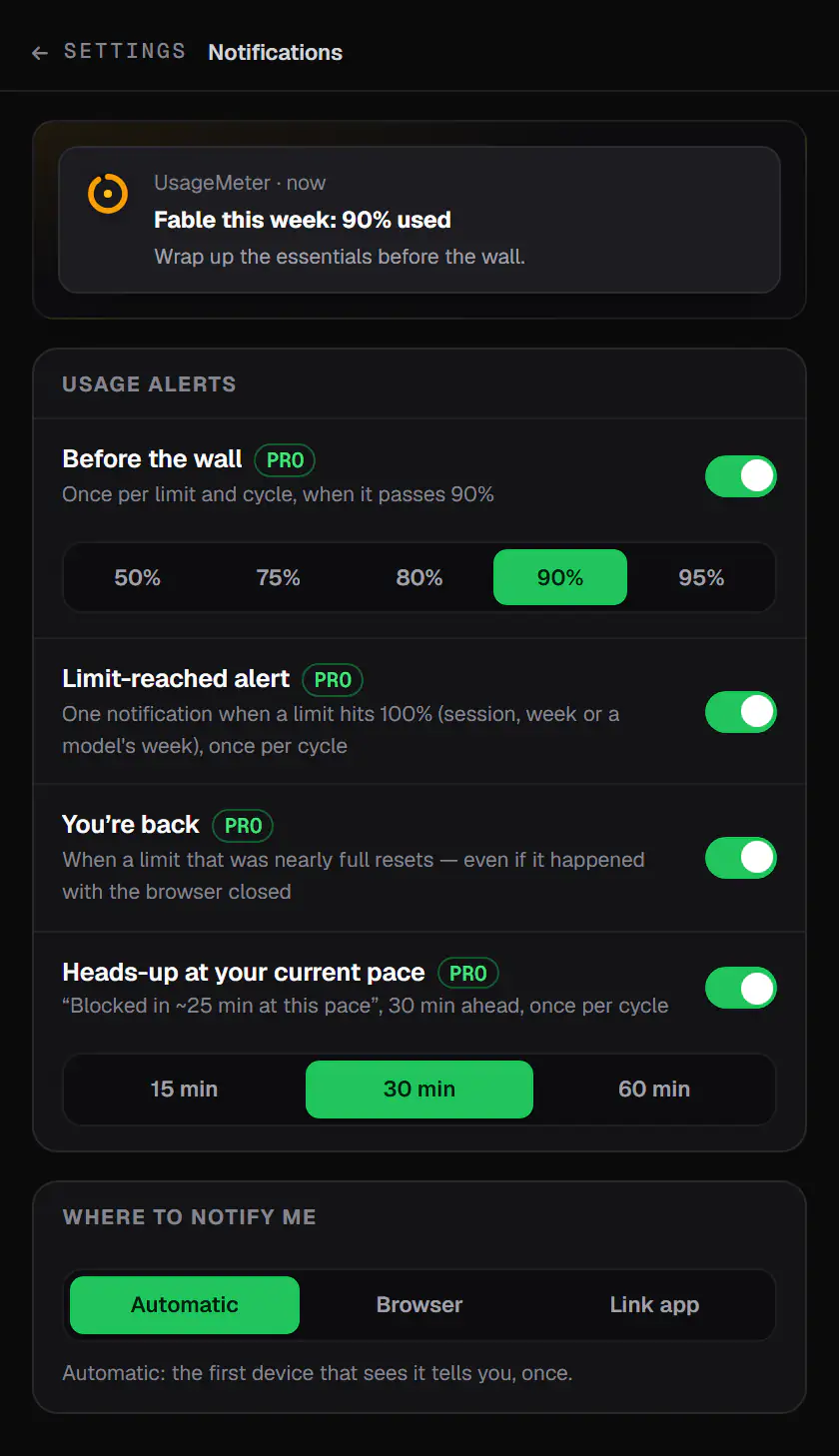
- Pro: notifications at your threshold (90 % by default), when your pace would block you soon, at 100 %, and when a limit is back. You can set quiet hours and choose which limits alert you.
The notifications come from the browser, so they reach you even when claude.ai isn't the active tab. If you use several browsers or the UsageMeter Link app for Claude Code, each alert is claimed once on our server and only the first device rings.
How to know when your limit is back
- Claude Code can wait for you: when a request hits the limit, it shows "Usage limit reached · continuing automatically at 3:45pm" and picks the task up after the reset. It needs Claude Code v2.1.234 or later and a claude.ai subscription; turn it off in
/config(Interactive mode). - claude.ai shows the reset time in the limit message and in Settings > Usage.
- UsageMeter Pro sends a notification the moment a limit is back, even if it reset while your browser was closed. Blocked on claude.ai, "Remind me at 6:49 PM" in its panel schedules the reminder in one click.
The weekly limit resets at a fixed time each week
Example: 63% of the weekly limit used on day 4 of 7. The dashed line is a steady pace to the reset (Thu 18:00).
- Your usage
- Steady pace
- At the current rate
At this pacethe limit is reached around Thu 02:00, before the reset.
| Measure | Value |
|---|---|
| Used so far | 63% |
| Days elapsed | 4 / 7 |
| Steady pace today | 57% |
| At the reset, at this rate | 110% |
| Limit reached | Thu 02:00 |
| Weekly reset | Thu 18:00 |

At a glance
| claude.ai | Claude Code | UsageMeter Free | UsageMeter Pro | |
|---|---|---|---|---|
| Warning near the 5-hour limit | Yes | At 85 % | Forecast on screen | At your threshold |
| Time you'll be blocked, at your pace | Not documented | Not documented | Yes | Yes, as a notification |
| Weekly limit | In Settings > Usage | At the limit | Forecast on screen | Before and at the limit |
| When a limit is back | Reset time shown | Auto-continue | Reset time shown | Notification |
| Same alert on several devices | — | — | — | Only once |
Sources: the Anthropic pages above; UsageMeter's changelog for version 1.6.0.
FAQ
Does Claude send a notification when I'm close to my limit?
Inside the app, yes. claude.ai shows "Approaching 5-hour limit." near the five-hour limit and Claude Code warns at 85 % of the session (Claude Code errors). These messages appear where you're working. For a notification at a threshold you choose, or when a limit is back, use a tracker such as UsageMeter.
Can I choose the percentage that triggers the warning?
Not in Claude: Anthropic doesn't publish the threshold of the claude.ai warning, and Claude Code's is 85 % of the session (Claude Code errors). UsageMeter Pro lets you set your own threshold, 90 % by default, and adds an alert when your current pace would block you soon (release notes).
How do I get notified when my Claude limit resets?
Claude Code can continue automatically after the reset if you leave the session open. On claude.ai, the reset time is in the limit message and in Settings > Usage. UsageMeter Pro sends a notification the moment the limit is back, even if the reset happened while your browser was closed.
Why did I get blocked without seeing "Approaching 5-hour limit"?
A few heavy replies late in a long conversation can use the last part of your session quickly, and a model's own limit or the weekly limit can block you before the five-hour session does. A pace-based forecast shows the time you would be blocked early enough to react.
Sources
- Troubleshoot Claude error messages, Anthropic help center, checked 24 September 2026
- Usage limit best practices, Anthropic help center, checked 24 September 2026
- Errors: usage limits, Claude Code docs, checked 24 September 2026
- Interactive mode: wait for a usage limit to reset, Claude Code docs, checked 24 September 2026
- UsageMeter changelog, version 1.6.0
What changed
- 24 September 2026: first version.