Claude usage limit reached: what it means and what to do
Hit “5-hour limit reached” or “You've hit your weekly limit”? Which limit it is, when it comes back, and what works now: a free reset, credits, a model.
"Usage limit reached" means one of your plan's limits is full, and the message says which one and when it comes back: on claude.ai it reads "5-hour limit reached - resets [time]", in Claude Code "You've hit your session limit · resets 3:45pm". Until then you can use a limit reset if you have one, continue on usage credits, switch model when only a model limit is full, or move to a bigger plan. A new chat or another browser changes nothing.
Which limit did you hit?
| What you see | Which limit | What works now |
|---|---|---|
| "Approaching 5-hour limit." | the session, almost full | finish what matters first |
| "5-hour limit reached - resets [time]." | the 5-hour session, back at [time] | a limit reset, usage credits, waiting |
| "5-hour limit resets [time] - continuing with usage credits." | the session; you are now on credits | you keep working, billed at API rates, until [time] |
| "You've hit your session limit · resets 3:45pm" (Claude Code) | the 5-hour session, back at 3:45pm | a limit reset (web or Desktop), usage credits, automatic continue |
| "You've hit your weekly limit · resets Mon 12:00am" (Claude Code) | the week, all models, back on Monday | a limit reset (web or Desktop), usage credits |
| "You've hit your Opus limit" or "Sonnet limit" (Claude Code) | that model family only | /model to another family |
Messages from Anthropic's error messages guide and the Claude Code docs; the times are their examples.
A full session blocks everything; a full model limit only blocks that model
Example: session 100%, week 71%, Fable 54%. Whichever fills first stops you.
Blockedevery model waits for the session reset.
| Limit | Used | Resets |
|---|---|---|
| 5-hour session | 100% | — |
| Weekly · all models | 71% | — |
| Weekly · Fable only | 54% | — |

On Max, the Fable ceiling works the same way: once Fable has used 50% of your weekly limits, you continue on usage credits or switch model (Claude Fable models on your plan).
What works right now
1. A limit reset, if you have one
Anthropic gives limit resets "occasionally to eligible plans". With Claude Opus 5.5, on 22 September 2026, it gave subscribers one, "which you can now save and use whenever you choose" (Anthropic). When you have one, a Reset for free button appears in Settings > Usage, in the Resets section, and on the limit message itself. Depending on the reset shown, it puts your 5-hour session or your weekly limit back to full, right away (What is a limit reset?). Before you click:
- it works on the web and in Claude Desktop, not in the mobile apps or in Claude Code, but the refilled limits apply everywhere;
- it can't be undone;
- if it has an expiry, the date is in Settings > Usage;
- it doesn't refund usage credits you were already billed for.
No button, no reset: Anthropic doesn't describe a way to ask for one.
2. Usage credits, on Pro and Max
Usage credits, the new name of Extra usage, let you "continue using Claude seamlessly after reaching their included usage limits", billed at standard API rates, separately from your subscription (Manage usage credits). In Settings > Usage, under Usage credits: Enable, set a monthly spend limit with Adjust limit, then Add funds. Bundles bought ahead cost less: $45 for $50 of credits, $200 for $250 and $700 for $1,000 (Buy usage bundles).
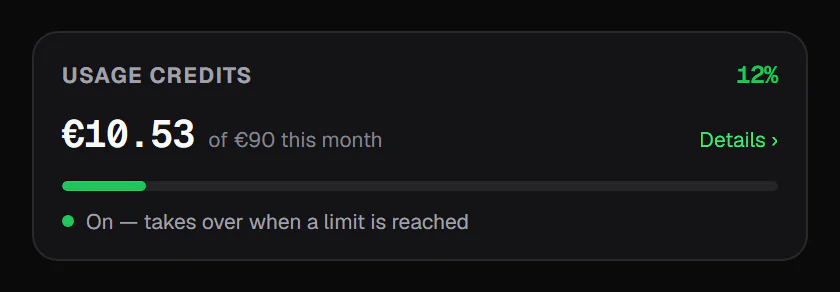
Usage credits: this month's spend against the limit you set
Usage credits: what this month cost past your plan's included usage, against the spend limit you set.
How it billscredits only start once the plan's included usage is used up.
| Measure | Value |
|---|---|
| Spent this month | €10.53 |
| Monthly limit | €90 |
| Left | €79.47 |

In Claude Code, /usage-credits (formerly /extra-usage) opens that page (Claude Code commands). One catch: on credits, Claude Code's prompt cache lasts five minutes instead of an hour, so after a coffee break the next message re-reads the whole conversation at full cost (Manage costs effectively). Setting promptCacheTtl to 1h keeps the hour (Prompt caching).
3. Another model, when only a model limit is full
"You've hit your Opus limit" or "Sonnet limit" in Claude Code only blocks that model family: switch with /model to keep working. Each model has its own cache, so the next request re-reads the conversation without cache hits (Claude Code errors). Every model shares the session and weekly limits: switching can't lift those.
4. Let Claude Code wait and continue
Since version 2.1.234, Claude Code waits in the open session and picks the task up after the reset, with a line reading "Usage limit reached · continuing automatically at 3:45pm · esc to cancel". It is on by default with a claude.ai subscription; turn it off in /config (Continue automatically at usage limit), and type /rate-limit-options to see the choices (interactive mode). In Claude Desktop's Code tab, the session-limit card has an Auto-continue when limits reset checkbox (Claude Code errors).
5. A bigger plan
Anthropic lists three ways out of a limit: wait, move to a higher plan, or turn on usage credits (Claude pricing FAQ). Max gives 5x or 20x Pro's usage per 5-hour session. If you hit the wall every day, that is the lasting fix; once a week, better habits usually are.
6. Wait, with the reset time in view
The session comes back about five hours after the message that opened it, the week at its fixed weekly time. Meanwhile, prepare your next request as one message.
The session comes back about five hours after the message that opened it
Example: first message at 10:00 → reset at 15:00. The next message, at 16:00, opens a new window.
| Period | From | To |
|---|---|---|
| Window 1 | 10:00 | 15:00 |
| No window | 15:00 | 16:00 |
| Window 2 | 16:00 | 21:00 |

What doesn't work
- Opening a new chat. Limits belong to your account, not to a conversation: a new chat makes the next messages cheaper, but gives nothing back.
- Another browser, the mobile app or Claude Desktop. Every Claude surface counts toward the same limit (How usage and length limits work).
- Logging out, clearing cookies, deleting conversations. Usage already counted stays counted.
Why the limit came so fast
Anthropic's Claude Code guide says "almost every 'I burned through my limit by lunchtime' report" traces back to a handful of habits (Models, usage, and limits in Claude Code). Chat works the same way: every reply re-sends the whole conversation, attached files included, so the tenth question about a long document costs far more than the first.
Why the limit arrives early: every reply carries the whole conversation
Tokens sent to the model at each turn of one chat (illustrative: 200-token messages, 600-token replies, 3k of attachments).
- Attachments
- History sent again
- Your message
- Reply
Takeawaya new chat for each new topic brings the cost back to turn 1.
| Turn | Tokens sent |
|---|---|
| 1 | 3.8k |
| 3 | 5.4k |
| 6 | 7.8k |
| 9 | 10.2k |
| 12 | 12.6k |
| 15 | 15k |
| 18 | 17.4k |
| 21 | 19.8k |
| 24 | 22.2k |

The full picture of what fills a window is in Claude usage limits explained.
To know before the wall whether you will make it to the reset, the free Claude limit calculator gives the time you would be blocked at your current pace, from what Settings > Usage shows and the reset time.
Five habits that stop it happening
- One topic, one chat. In Claude Code,
/clearbetween tasks is "the single most effective lever for both quality and cost" (Models, usage, and limits in Claude Code). - Put big files in a Project. Its cached portions "count less against your limits than new content", as long as you come back before the cache expires (Usage limit best practices).
- Match the model to the job. Opus "uses meaningfully more of your quota": keep it for the hard parts (Models, usage, and limits in Claude Code).
- Batch small questions into one message (Usage limit best practices), and lower the effort for routine work (How usage and length limits work).
- Watch the session and its reset time, not the wall. How to check your Claude usage lists every place to see it.
Claude Code specifically
- Run
/usagebefore a long task. Its attribution rows show which skill, subagent, plugin or MCP server took your recent usage, on that machine (Manage costs effectively). - Prefer
/clearto/compactbetween tasks. Compacting a large context is itself a large request;/clearcosts nothing (Manage costs effectively). - Keep agent teams small. Anthropic says they use approximately 7x more tokens than a standard session when teammates run in plan mode (Manage costs effectively).
How UsageMeter helps
UsageMeter is a free extension for Chrome, Edge and Firefox, independent and not affiliated with Anthropic. It shows every limit claude.ai reports, on the page and on the toolbar icon, with its reset time and the time you would be blocked at your current pace. If you pay for usage credits, the popup shows this month's spend against your cap. Pro adds notifications before a limit is full, at 100% and the moment it comes back (never twice across your devices), a "Remind me at…" button when you are blocked, and charts of the last 24 hours and 7 days (compare plans).
FAQ
How long until I can use Claude again?
The message tells you: "5-hour limit reached - resets [time]" on claude.ai, a time such as "resets 3:45pm" in Claude Code. The session returns about five hours after the message that opened it; the weekly limit at your account's fixed weekly reset time, shown in Settings > Usage.
What is the Reset for free button in Claude?
It is a limit reset, which Anthropic grants occasionally to eligible plans; subscribers got one on 22 September 2026. It refills your 5-hour session or your weekly limit right away, depending on the offer. It sits in Settings > Usage on the web and in Claude Desktop, and on the limit message; it can't be undone and may expire.
Does starting a new chat reset Claude's limit?
No. Limits belong to your account, across claude.ai, Claude Desktop, the mobile apps and Claude Code. A new chat is cheaper per message because it doesn't carry the old history: it helps you last longer, but gives back nothing you have already used.
Is Extra usage the same as usage credits?
Yes: usage credits is the current name. On Pro and Max they bill usage past your plan's limits at standard API rates, up to a monthly spend limit you choose, and bundles bought ahead cost up to 30% less (Buy usage bundles).
Why did I hit the limit without using Claude much?
Something else is using your account: Claude Code (scheduled tasks and agent teammates send requests while you are idle), Cowork, another device, or one long chat with large files. In Claude Code, /usage attributes recent usage to skills, subagents and MCP servers on that machine.
Sources
- Anthropic help center, Troubleshoot Claude error messages (claude.ai messages)
- Anthropic help center, What is a limit reset?
- Anthropic, Introducing Claude Opus 5.5 (22 September 2026: one limit reset for subscribers, higher five-hour limits)
- Anthropic help center, Manage usage credits for paid Claude plans and Buy usage bundles
- Anthropic help center, Claude Fable models on your plan
- Anthropic help center, Models, usage, and limits in Claude Code
- Anthropic help center, Usage limit best practices and How do usage and length limits work?
- Anthropic, Plans and pricing (checked 24 September 2026)
- Claude Code docs, Errors: usage limits, Interactive mode, Manage costs effectively, Prompt caching and Commands
What changed
- 24 September 2026: new guide, every fact checked against the sources above: limit resets (Reset for free, and the one subscribers received on 22 September 2026), usage credits and bundles (formerly Extra usage), Claude Code's automatic continue, the exact limit messages.