Show your Claude stats on your GitHub profile
Live Claude widgets for your GitHub README: Claude Code tokens, days with Claude, streak and trophies, in 19 themes. Free, opt-in, ready in a minute.
Your GitHub profile shows what you ship. Now it can show how you build with Claude: UsageMeter's widgets put your Claude Code tokens, a GitHub-style grid of your days with Claude, your streak, your trophies and your models on your README, as cards or badges that update themselves. Six of the eight widgets are free, with six themes and every layout option. Nothing is public until you switch it on, and adding one takes a minute.
What can you show?
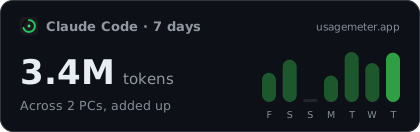 Sample data
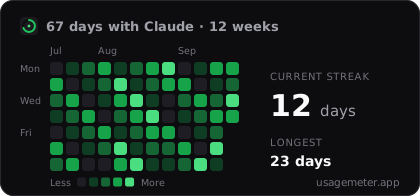 Sample data
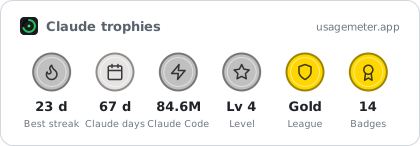 Sample data
 Sample data
There are eight widgets in all:
| Widget | Shows | Needs | Plan |
|---|---|---|---|
| Tokens | Claude Code tokens over the last 7 days, all PCs added up | UsageMeter Link | Free (30 days with Pro) |
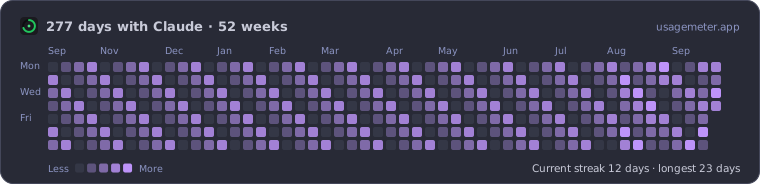
| Days with Claude | A 12-week grid of the days you used Claude, with your streak | The extension or Link | Free (26 or 52 weeks with Pro) |
| Streak & league | Your daily streak, your level and your league | The extension | Free |
| Models | The Claude Code models you used, with their share | UsageMeter Link | Free (30 days with Pro) |
| Trophies | Six medals, bronze to diamond: best streak, days with Claude, Claude Code tokens, level, league and badges | The extension or Link | Free |
| Live limits | Your Claude limits right now, refreshed every five minutes | The extension, separate switch | Free |
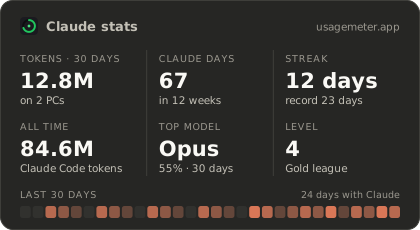
| All-in-one stats | Tokens over 30 days, days with Claude, streak, all-time tokens, top model and level, on one card | The extension or Link | Pro |
| Cost | What your Claude Code would cost at API prices | UsageMeter Link, separate switch | Pro |
Source: the widgets page.
How do I add Claude stats to my GitHub profile?
- Turn them on. Sign in, open your widgets and switch on the ones you want public. Each one has its own switch.
- Give it your style. In the widget builder, pick a widget, a theme, a card or a badge, the corners and the size, and watch the result live with your own figures. Save it as your default style if you like.
- Paste the code. Copy the GitHub snippet into the
README.mdof your profile repository.
Your profile README is the README.md at the root of a public repository named exactly like your GitHub username; GitHub shows it at the top of your profile as soon as it has content (Managing your profile README).
The code, for light and dark mode
GitHub lets a README show a different picture in light and dark mode with the HTML <picture> element and prefers-color-scheme (GitHub changelog). The builder writes it for you, with the dark and light version of the theme you picked; with the GitHub themes it looks like this, your own link id in place of YOUR-ID:
<a href="https://usagemeter.app">
  <picture>
    <source media="(prefers-color-scheme: dark)" srcset="https://usagemeter.app/api/badge/YOUR-ID/heatmap.svg?theme=github-dark">
    <img alt="My days with Claude" src="https://usagemeter.app/api/badge/YOUR-ID/heatmap.svg?theme=github-light" width="420" height="196">
  </picture>
</a>
Prefer plain Markdown, a website, Notion or Obsidian? The builder has a tab for each, plus a shields.io endpoint for a classic badge.
Save a default style and the short links follow it: change the theme once in your account and every README that uses a link without options changes with it.
Make it yours
Every widget comes as a card or as a small shields.io-style badge, in three sizes, with its labels in English, French or German. Free, you also choose:
- the theme: dark, light, auto (it follows each visitor), transparent, GitHub dark or GitHub light;
- the corners, from square to round, and the border, on or off;
- the title row, shown or hidden, and a compact form for a denser profile.
 Sample data
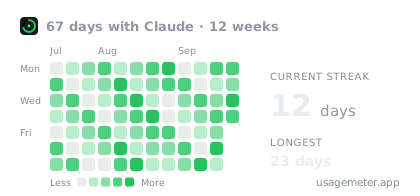 Sample data
What Pro adds
UsageMeter Pro unlocks everything else:
- 13 more themes: Claude, Claude ivory, Dracula, Nord, Tokyo Night, Catppuccin, Catppuccin Latte, Gruvbox, Solarized dark and light, One Dark, Rosé Pine and Rosé Pine Dawn;
- your own colours for the accent, the background, the text and the border;
- longer ranges: tokens and models over 30 days, the grid of days over 26 or 52 weeks;
- two more widgets: the all-in-one stats card and the Claude Code cost at API prices;
- no UsageMeter branding on the card, and a load animation that stays still for visitors who ask for reduced motion.
 Sample data
 Sample data
On a free account, a Pro option falls back to the free look instead of breaking your README: a Pro theme shows as dark or light, and the other Pro options are left out. The Pro widgets show a small "UsageMeter Pro" card instead of your figures.
Is it private?
Widgets are strictly opt-in. Nothing is public until you switch on the widgets you choose, and your live limits and your cost each have their own separate switch, off by default: the limits show when you are using Claude right now, the cost what your month is worth. A widget never shows your email, your Claude accounts, your projects, the names of your PCs or your conversations. To stop, turn a widget off, turn everything off, or ask for a new link: old embeds then show "Widget turned off" instead of your figures once image caches refresh, usually within the hour.
FAQ
How often do the widgets update?
Every widget is recalculated at most once an hour, and the live limits every five minutes. GitHub serves README images through its own image cache, which can add a delay before a change appears on your profile.
Which widgets and themes are free?
Six widgets (tokens, days with Claude, streak & league, models, trophies and live limits) and six themes (dark, light, auto, transparent, GitHub dark and GitHub light), with every layout option. Pro adds the all-in-one stats and cost widgets, 13 themes, your own colours, longer ranges and the option to hide the UsageMeter branding.
Why are some days hollow on my 52-week grid?
UsageMeter keeps the readings of the extension's gauges for about 88 days. Older days count from Claude Code alone, through UsageMeter Link, and a day with no data at all is drawn hollow, marked "No data", rather than as a day without Claude. Nothing is filled in by guesswork.
Do I need UsageMeter Link for the widgets?
For the Claude Code widgets, yes: the tokens, the models and the cost come from UsageMeter Link, the free Windows app that reads Claude Code on your PCs. The grid of days with Claude, the streak, the trophies and the live limits also work with the browser extension alone.
Can I use them outside GitHub?
Yes. The builder gives you the code for Markdown, a website (HTML or an iframe), Notion and Obsidian, and a shields.io endpoint. The same widget link works everywhere you paste it.
Can someone find my account from a widget?
No. A widget link carries a random id, not your email or your account name, and it shows only the figures of the widgets you switched on. Ask for a new link at any time and the old one stops showing your figures.
Sources
- Managing your profile README, GitHub Docs, checked 24 September 2026
- Specify theme context for images in Markdown, GitHub changelog, 15 August 2022
- UsageMeter widgets, usagemeter.app
What changed
- 24 September 2026: trophies and all-in-one stats widgets, 19 themes, your own colours, corners, borders, compact form, longer ranges and a saved default style.
- 24 September 2026: first version.