UsageMeter 1.7.3: your usage % is back in Claude Code
UsageMeter 1.7.3 puts your usage % back in Claude Code on the web, next to the model picker of the new layout, with every limit one hover away.
UsageMeter 1.7.3 puts your usage percentage back in Claude Code on the web, right next to the model picker. Claude Code's new layout moved Claude's own usage ring, so UsageMeter 1.7.2 no longer found it and showed nothing; 1.7.3 finds it again. Like every gauge UsageMeter shows on the page, it is free, and the update installs itself.
Where is my usage % in the new Claude Code?
On claude.ai/code, Claude Code now opens in the layout Anthropic documents for the Code tab of Claude Desktop: panes you arrange as you like, and a row under the prompt box with the permission mode, the model picker and Claude's usage ring. "Both layouts have the usage ring next to the model picker", say Anthropic's docs, and clicking it shows your plan usage (Claude Desktop docs).
UsageMeter 1.7.2 still looked for the ring of the earlier layout, so on the new one its percentage never appeared. Version 1.7.3 recognises the new ring and sits right next to it: for example 34 % ↓, with an arrow for your pace and a small ring of its own. Claude's ring is hidden while UsageMeter's percentage is there, so you see one gauge, not two.
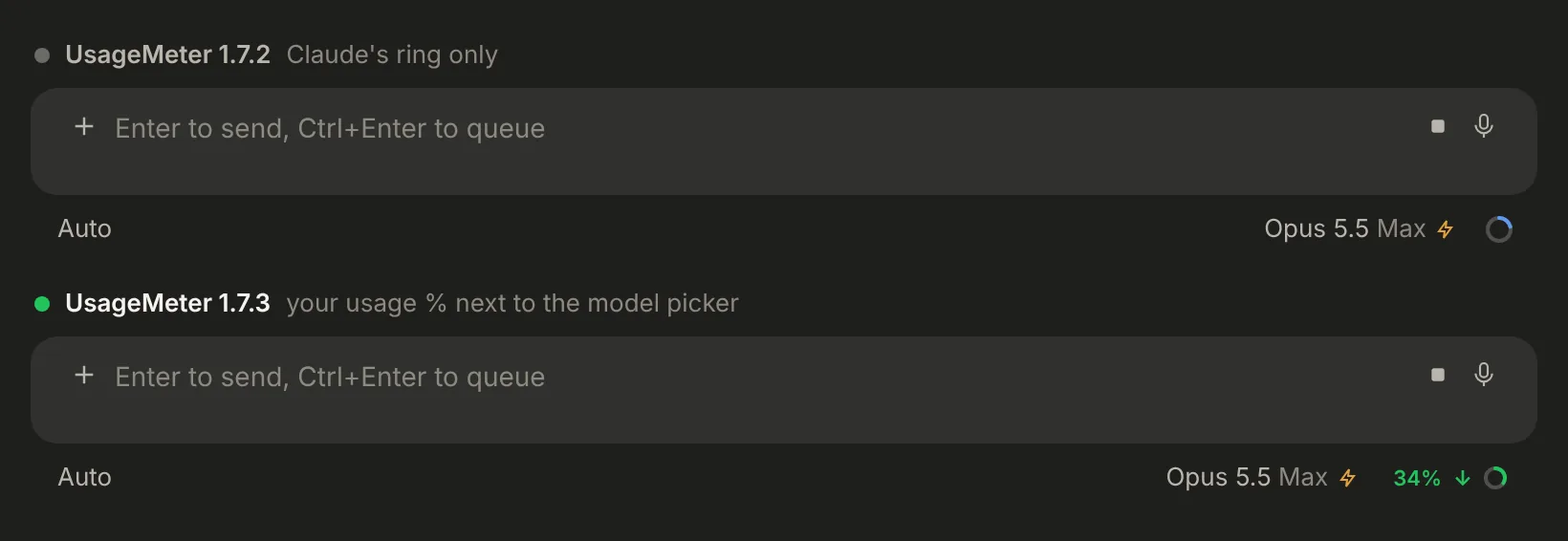 Sample data
If the ring is not on the page, for instance while the session is still loading, the percentage takes its place right after the model picker. It only ever appears on Claude Code pages; your chats on claude.ai keep their own indicator.
What do I see when I hover it?
The same details as in your chats on claude.ai: every limit Claude reports for your account, the time left before each one resets, and whether your pace leaves a comfortable margin. Hover the percentage to open them, click it to keep the panel open while you work, and press Esc or click anywhere else to close it.
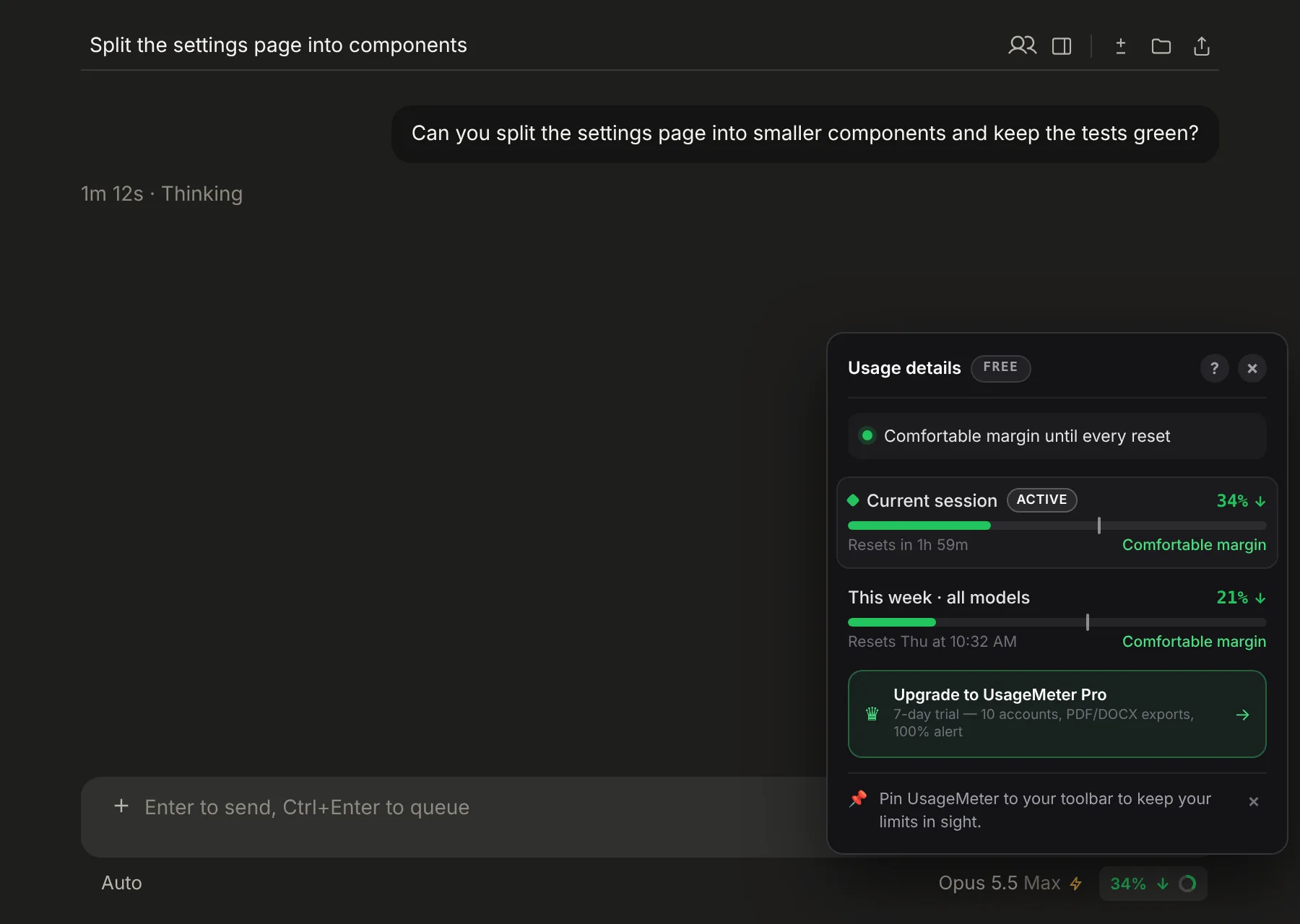 Sample data
Which limit the percentage follows is up to you: your current session by default, or another one in UsageMeter's Settings > On claude.ai > Usage indicator, on the Claude Code line. Chats and Claude Code each keep their own choice. To read your limits in the browser, the desktop app and the terminal, see how to check your Claude usage.
One gauge, even after switching the indicator off and on
Turn off Usage indicator and UsageMeter steps aside: Claude's ring comes back in its place. Until now, turning the switch back on left Claude's ring on screen next to UsageMeter's percentage. In 1.7.3 the swap works both ways.
It also holds when Claude Code redraws the message box, for example when you open another session: Claude's ring is hidden again and the percentage moves next to it straight away, without waiting for the next refresh.
The account switcher stays within reach
UsageMeter keeps your Claude accounts one click apart, up to 3 for free and up to 10 with Pro (plans). In Claude Code its button lives in the sidebar. When the page shows no sidebar to hold it, 1.7.3 puts it in the session's title bar, first of its tools, and moves it back to the sidebar as soon as one appears.
How do I get UsageMeter 1.7.3?
You don't have to do anything: the extension updates itself once your browser's store has approved the version, and your claude.ai tabs keep working. After the update, one line in the popup tells you what changed. Not installed yet? It takes a minute.
Free and Pro
Everything in 1.7.3 is free: the percentage and its details panel in Claude Code, the indicator switch and the account button. Pro adds the alerts before you hit a limit, the History charts, the full history on the web dashboard and up to 10 accounts (see the plans).
FAQ
Why did my usage % disappear from Claude Code?
Claude Code's new layout on the web moved Claude's usage ring into the row under the prompt box, next to the model picker, and drew it differently. UsageMeter 1.7.2 looked for the earlier ring, found nothing to stand next to and showed nothing. Version 1.7.3 recognises the new ring, and uses the model picker as its anchor when the ring is missing.
Do I need to do anything to get the fix?
No. UsageMeter updates itself once the Chrome Web Store or Firefox Add-ons has approved the version. Each store reviews it first, which can take from a few minutes to a few days, and the update arrives on its own afterwards. Your claude.ai tabs keep working, and the popup tells you in one line what changed.
Can I show my weekly limit instead of the session?
Yes. In UsageMeter's Settings > On claude.ai > Usage indicator, the Claude Code line sets which limit the percentage follows on Claude Code pages, and the Chat line does the same for your chats. The details panel always lists every limit Claude reports for your account, whichever one the percentage follows.
How do I get Claude's own ring back?
Turn off Usage indicator in UsageMeter's Settings > On claude.ai. The percentage disappears and Claude's ring comes back in its place. Turn the switch back on and the percentage returns. Since 1.7.3, Claude's ring is hidden again at the same moment, so the two never show side by side.
Does UsageMeter read my Claude Code sessions?
No. UsageMeter works with usage percentages and token counts only: your prompts, your code and Claude's replies are never read, stored or sent anywhere. On Claude Code pages it only adds its percentage and its details panel next to the model picker, from the usage figures your account already reports.
Sources
- Claude Desktop: check usage, Claude Code docs (the current and earlier layouts of the Code tab, the usage ring next to the model picker), checked 26 October 2026
- UsageMeter, changelog of version 1.7.3
What changed
- 26 October 2026: first published version, for UsageMeter 1.7.3.