UsageMeter 1.6: see your Claude limit before you hit it
UsageMeter 1.6 tells you when Claude will block you, what each reply cost your session and what you can spend today, and puts your Claude stats on GitHub.
UsageMeter 1.6 tells you when Claude will block you, not only how much of your limit is gone. It also prices every reply on claude.ai, spreads what is left of your week into a budget for today, and puts your Claude stats on your GitHub profile. It is rolling out to Chrome, Edge and Firefox now and installs by itself.
When will Claude block me?
Claude warns you when you get close: claude.ai shows "Approaching 5-hour limit." and Claude Code says "You've used 85% of your session limit" (Anthropic help center, Claude Code docs). Neither tells you when you will run out at the pace you are going.
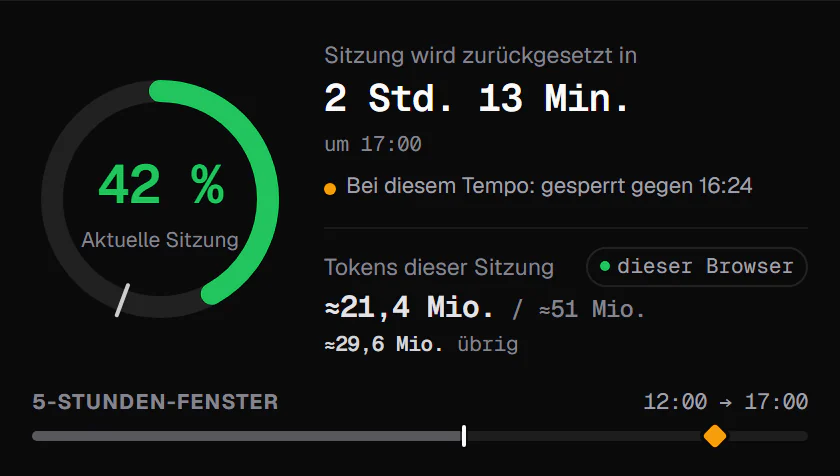
UsageMeter 1.6 does. It looks at how fast your session moved over the last 45 minutes (the last 12 hours for the weekly limit) and turns it into a time: "At this pace: blocked around 9:40 PM". The line sits in the popup and in the tooltip of the toolbar icon, and it follows your pace. Slow down and the time moves later; stop, and it goes away.
What did that reply cost?
Anthropic doesn't publish a fixed number of messages: what a reply costs depends on the length of the conversation, the files attached, the model and the features used (Usage limit best practices). So UsageMeter measures it. Under each reply on claude.ai, and in the message box, you see what that reply took from your session, for example "+1.8 %".
When Claude Code or another chat moved your limit at the same moment, one reply can't be singled out. UsageMeter then shows "≈" or nothing, never a wrong number. Before you send a file, it also estimates its weight, for example "report.pdf ≈ 38k tok · ~4 % of session", computed on your device.
A later reply costs more: the whole conversation is sent again with every turn
Tokens sent to the model at each turn of one chat (illustrative: 200-token messages, 600-token replies, 3k of attachments).
- Attachments
- History sent again
- Your message
- Reply
Takeawaya new chat for each new topic brings the cost back to turn 1.
| Turn | Tokens sent |
|---|---|
| 1 | 3.8k |
| 2 | 4.6k |
| 4 | 6.2k |
| 6 | 7.8k |
| 8 | 9.4k |
| 10 | 11k |
| 12 | 12.6k |
| 14 | 14.2k |
| 16 | 15.8k |
| 18 | 17.4k |
| 20 | 19k |

Alerts before the wall (Pro)
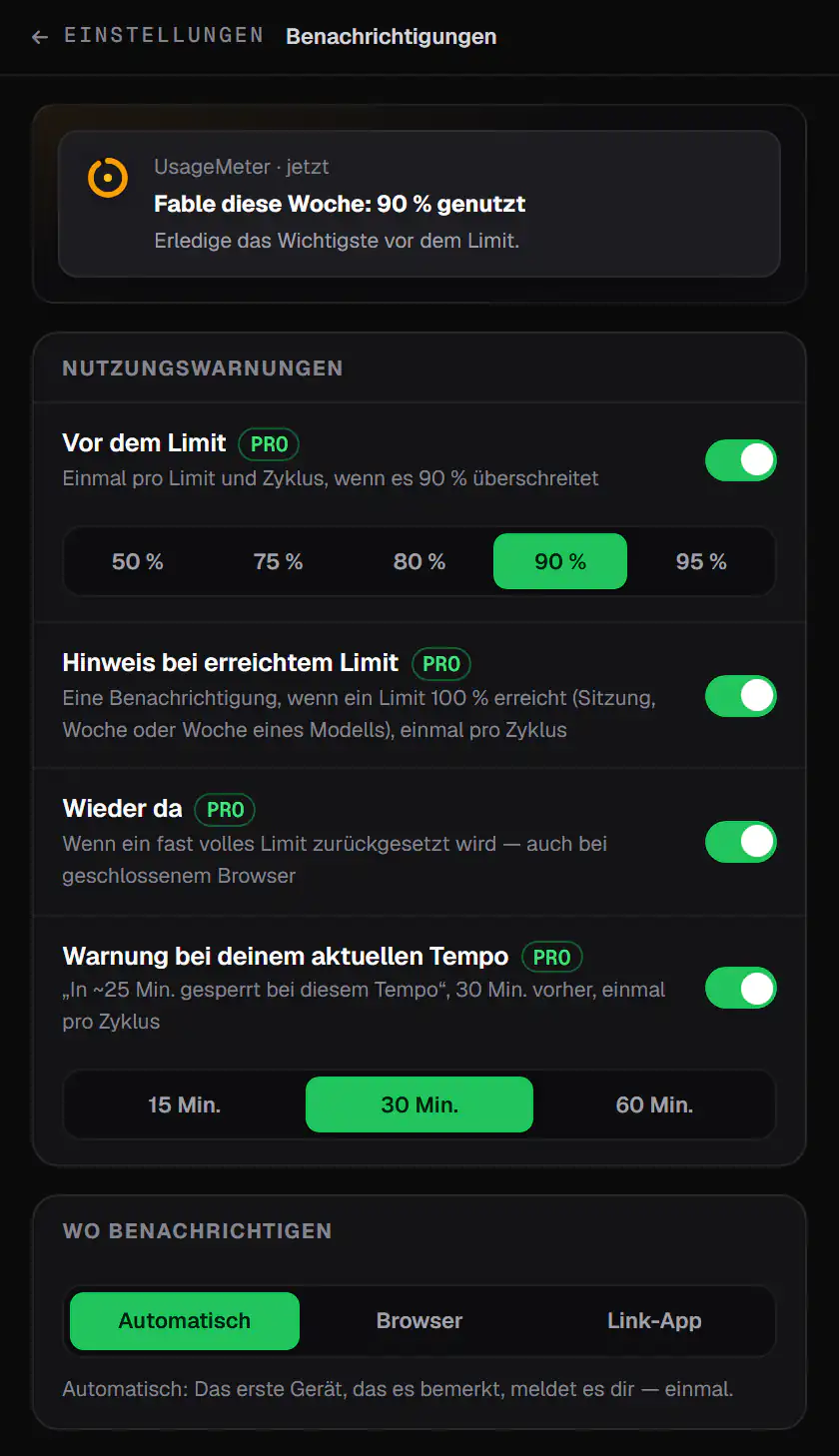
With Pro, UsageMeter sends a notification at your threshold (90 % by default, adjustable), when your current pace would block you soon, at 100 %, and the moment a limit is back, even if it reset while your browser was closed (release notes).
Each alert is claimed once on our server before it shows, so the first device to see it rings and your other browsers and the UsageMeter Link app stay quiet. You can also turn on a heads-up the day before your weekly reset when much of your week is still unused. And if you are already blocked on claude.ai, "Remind me at 6:49 PM" in the panel brings you back at the reset.
How much can I use today?
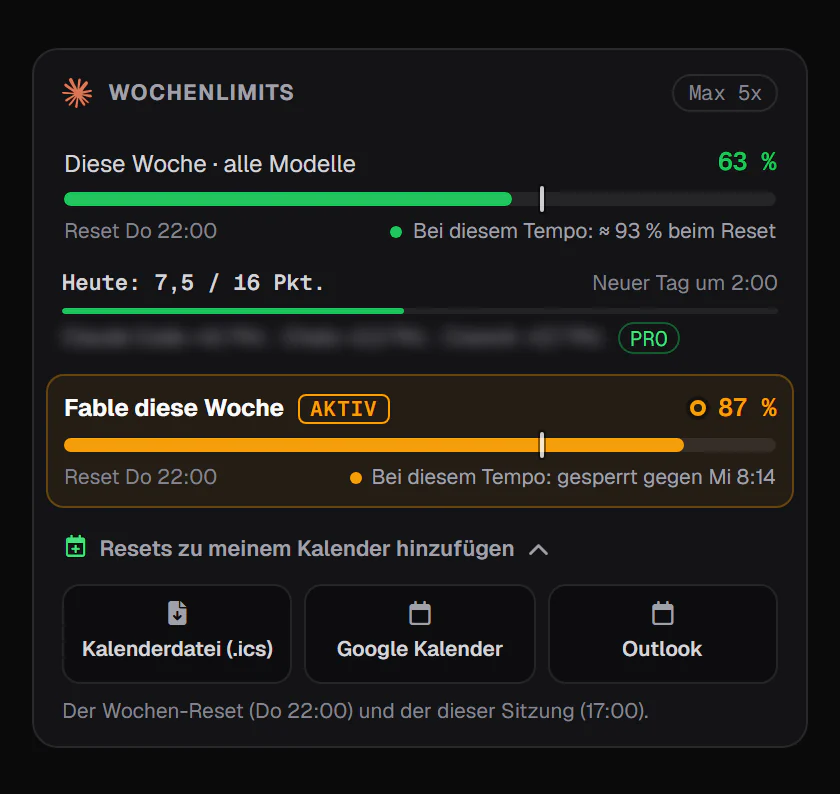
Your weekly limit resets at a fixed time each week assigned to your account, shown in Settings > Usage (What is the Pro plan?). UsageMeter spreads what is left of it over the days until that reset: "Today: 8 / 12 pts" is today's share, next to a timeline of your five-hour window. One click sends your resets to Google Calendar, Outlook or an .ics file.
The week with the pace line and the fixed reset
Example: 63% of the weekly limit used on day 4 of 7. The dashed line is a steady pace to the reset (Thu 18:00).
- Your usage
- Steady pace
- At the current rate
At this pacethe limit is reached around Thu 02:00, before the reset.
| Measure | Value |
|---|---|
| Used so far | 63% |
| Days elapsed | 4 / 7 |
| Steady pace today | 57% |
| At the reset, at this rate | 110% |
| Limit reached | Thu 02:00 |
| Weekly reset | Thu 18:00 |

Your Claude stats on your GitHub profile
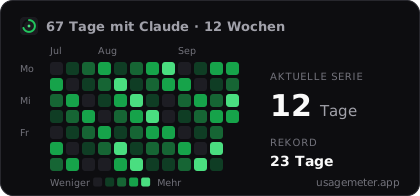
New on usagemeter.app: widgets for your README. Your Claude Code tokens, a GitHub-style grid of your days with Claude, your streak and your models, as cards or badges that follow your usage within five minutes and your visitors' light or dark theme. Nothing is public until you switch it on, and one click turns everything off.
 Beispieldaten
The full guide, with the code to paste and every option: Show your Claude stats on your GitHub profile.
Everything else in 1.6
Claude down? Not your limit
when Claude is down or overloaded, the popup and a pill under the message box say so, with a link to the status page.
Gauges for free Claude accounts
UsageMeter reads the limits Claude sends with each reply.
Share my week
your week by product on a card, ready for your socials.
Claude Code routines
today's runs next to your limits, with a Pro alert at 80 % (release notes).
Side panel and a two-ring icon
session and week at a glance, and Alt+Shift+U to open it.
Firefox for Android
the gauges on your phone.
Updates that install themselves
no more red "reload" message on claude.ai.
Easier to read and to drive
stronger contrast, 1 to 5 to switch tabs, R to refresh.
UsageMeter Link 0.5 for Claude Code
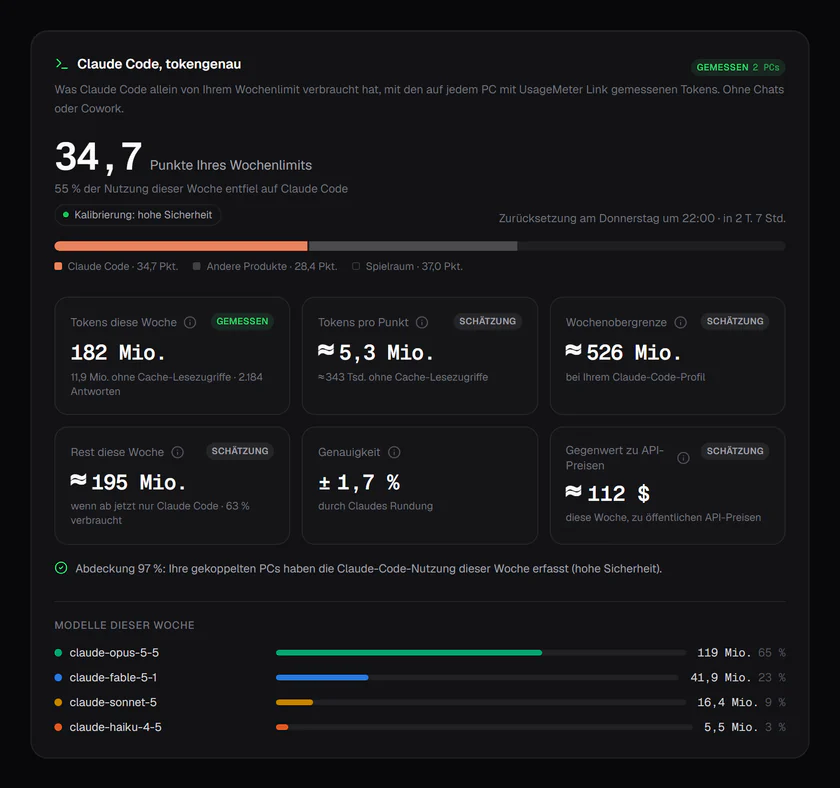
The free Windows companion adds up Claude Code across your PCs. Version 0.5 shows where the tokens go: sub-agents, MCP servers, skills and plugins, the tokens re-read after a break and your limit hits, over 7, 30 or 90 days, on the web dashboard (Pro). Its tray icon becomes a ring in the colour of your closest limit, and it pairs with your account in one click. Claude Code's own /usage shows a similar breakdown for the machine it runs on (Claude Code commands); Link adds every PC together and keeps the history.
How do I get UsageMeter 1.6?
You don't have to do anything: the extension updates itself within minutes of your browser store approving the version, and your claude.ai tabs keep working. After the update, one sentence in the popup tells you what changed. Not installed yet? It takes a minute.
FAQ
Is UsageMeter 1.6 free?
Most of it is. The forecast, the price of every reply, today's budget, the incident pill, gauges for free Claude accounts, the side panel and the GitHub widgets are free. Alerts before the wall, the reminder at the reset, the chats that weighed most on your week and where your Claude Code tokens go are part of Pro, with a 7-day trial.
Does UsageMeter read my conversations?
No. UsageMeter works with usage percentages and token counts only. Your conversations are never read, stored or sent anywhere. The price of a reply comes from how much your session moved, not from the text of the reply.
Why does a reply sometimes show "≈" instead of a price?
Because something else moved your limit at the same time: Claude Code, another chat or another device. Your session only reports one total, so UsageMeter can't say which part belongs to that reply. It shows "≈" or nothing rather than a number that could be wrong.
Will my laptop and my desktop both ring for the same alert?
No. Before an alert shows, the device claims it on our server. Only the first one gets the go-ahead; the others, including the UsageMeter Link app on Windows, stay quiet for that alert.
Can UsageMeter raise or reset my Claude limit?
No. Only Anthropic sets and resets Claude's limits. UsageMeter shows them, forecasts them and warns you. Anthropic occasionally gives subscribers a limit reset you can use from Settings > Usage (What is a limit reset?).
Sources
- Troubleshoot Claude error messages, Anthropic help center, checked 24 September 2026
- Usage limit best practices, Anthropic help center, checked 24 September 2026
- What is the Pro plan?, Anthropic help center, checked 24 September 2026
- Errors: usage limits and Commands, Claude Code docs, checked 24 September 2026
- UsageMeter changelog, version 1.6.0
What changed
- 24 September 2026: first version, for UsageMeter 1.6.0 and UsageMeter Link 0.5.0.