Claude usage limits explained: 5-hour, weekly and Fable
Claude has a rolling 5-hour session limit and, on paid plans, a weekly limit shared by chat, Desktop and Claude Code. How each one fills and resets.
Claude limits your use in two layers: a 5-hour session limit on every plan, which rolls from your first message, and on paid plans a weekly limit that resets at a fixed time each week. Both are shared by claude.ai, Claude Desktop, the mobile apps and Claude Code, and both measure how much Claude processes rather than how many messages you send: Anthropic says there is "no fixed message count" (Claude pricing FAQ).
How the 5-hour session limit works
Anthropic describes it as a "rolling five-hour session window" and applies it to every plan (Claude pricing FAQ). In practice the window opens with the first message you send while no window is running and closes about five hours later, whatever you do in between: send your first message at 09:00 and the session resets at 14:00. Then nothing runs until your next message opens a new window. Anthropic doesn't document the exact start rule, so trust the reset time Claude shows you.
The 5-hour window starts with your first message, not at a fixed time
Example: first message at 09:00 → reset at 14:00. The next message, at 15:00, opens a new window.
| Period | From | To |
|---|---|---|
| Window 1 | 09:00 | 14:00 |
| No window | 14:00 | 15:00 |
| Window 2 | 15:00 | 20:00 |

Two things follow from that:
- Pacing matters more than volume. A burst of long messages early in the window can fill it in an hour and leave you waiting for the rest.
- The time left matters as much as the percentage. For example, 80% used with ten minutes left is fine; 80% with four hours left means slowing down or changing model.
On paid plans, Settings > Usage shows the session as Current session, with the time remaining (Usage limit best practices). The Free plan runs on the same five-hour logic, but "the number of messages you can send will vary based on demand" (Get started with Claude).
How the weekly limit resets
Pro, Max, Team and seat-based Enterprise plans add a weekly limit that "applies across all models". It is not a rolling seven days: it resets at a fixed time each week assigned to your account, and that day and time "stay the same regardless of when you start using Claude or when your subscription begins" (What is the Pro plan?). Settings > Usage shows your next reset under Weekly limits.
The week resets at a fixed time: the pace line shows whether you are ahead of it
Example: 63% of the weekly limit used on day 4 of 7. The dashed line is a steady pace to the reset (Thu 18:00).
- Your usage
- Steady pace
- At the current rate
At this pacethe limit is reached around Thu 02:00, before the reset.
| Measure | Value |
|---|---|
| Used so far | 63% |
| Days elapsed | 4 / 7 |
| Steady pace today | 57% |
| At the reset, at this rate | 110% |
| Limit reached | Thu 02:00 |
| Weekly reset | Thu 18:00 |

Every message counts against the session and the week at the same time. The Claude Code docs warn that a single burst of heavy activity "can exhaust the weekly allowance before the session window resets" (Claude Code errors).
Fable and other model limits
Some models have a ceiling of their own inside the weekly limit (Claude Fable models on your plan):
- Fable 5 and Fable 5.1 on Max (and premium Team seats): up to 50% of your weekly limits at no extra cost, then usage credits or another model. It is a ceiling, not extra room: "you can never use more than your weekly limit".
- Fable on Pro (and standard Team seats): not included in the plan's limits at all. It runs on usage credits from the first message.
- Claude Code can also stop you with an Opus limit or a Sonnet limit that blocks only that model family; switching family with
/modelkeeps you working (Claude Code errors).
A model limit can block you while the session and the week still have room
Example: session 35%, week 62%, Fable 100%. Whichever fills first stops you.
Blockedonly Fable is blocked: switch model and keep working.
| Limit | Used | Resets |
|---|---|---|
| 5-hour session | 35% | — |
| Weekly · all models | 62% | — |
| Weekly · Fable only | 100% | — |

How much usage each plan gets
Anthropic doesn't publish limits in tokens or messages. It publishes multipliers: Pro gives "at least 5x more usage per 5-hour session than Free", and Max "5x or 20x more usage per 5-hour session than Pro" (Claude pricing FAQ). On 22 September 2026, with Claude Opus 5.5, it raised the five-hour limits of Pro, Max, Team and seat-based Enterprise plans without saying by how much (Anthropic).
Anthropic publishes multipliers, not token counts
Usage per 5-hour session relative to Pro, as Anthropic describes its plans. Prices are not part of this chart.
Per sessionthe same multiplier buys fewer messages when each message carries a long conversation or big files.
| Plan | Relative to Pro |
|---|---|
| Free | ≤ 1/5 of Pro |
| Pro | the reference |
| Max 5x | 5× Pro |
| Max 20x | 20× Pro |

Not sure which plan fits your use? The free Claude plan picker asks six questions and suggests a plan from Anthropic's published prices and multipliers.
| Plan | Per session | Weekly limit | Fable | Price (US) |
|---|---|---|---|---|
| Free | the baseline | none published | no | $0 |
| Pro | ≥ 5× Free | yes | credits only | $20/month |
| Max 5x | 5× Pro | yes | ≤ 50% of the week | $100/month |
| Max 20x | 20× Pro | yes | ≤ 50% of the week | $200/month |
Source: claude.com/pricing and the Max plan article, checked on 24 September 2026. Pro is $17 a month billed yearly; taxes excluded, local prices vary.
What fills a window
The unit is tokens. Anthropic lists what drives usage: message length, attachment size, the length of the current conversation, tools like Research and web search, the model, the effort level, artifacts and multi-step tasks (Usage limit best practices). The biggest one is invisible:
- The whole conversation is sent again with every message. Anthropic's Claude Code docs say it outright: it "sends your full conversation with every request" (Manage costs). In a chat, a late reply costs far more than an early one, even for a one-line question.
- Files and Project knowledge count while they are in context. Project content is cached and "counts less against your limits when reused", until the cache expires after a break (Usage limit best practices).
- Model and effort. Bigger models and higher effort use more, and you can't turn off thinking on Opus 5.5 or the Fable models (Manage costs).
- Tools and connectors are "token-intensive" (How usage and length limits work).
- Claude Code also sends tool results (file contents, test output, diffs): "one debugging session can consume more than a day of chat" (Manage costs).
Each reply re-sends the whole conversation; a new chat starts cheap again
Tokens sent to the model at each turn of one chat (illustrative: 200-token messages, 600-token replies).
- History sent again
- Your message
- Reply
Takeawaya new chat for each new topic brings the cost back to turn 1.
| Turn | Tokens sent |
|---|---|
| 1 | 800 |
| 2 | 1.6k |
| 4 | 3.2k |
| 6 | 4.8k |
| 8 | 6.4k |
| 10 | 8k |
| 12 | 9.6k |
| 14 | 11.2k |
| 16 | 12.8k |
| 18 | 14.4k |
| 20 | 16k |

Starting a new chat for each new topic is the cheapest habit there is.
What to do when a limit is full
Wait for the reset time Claude shows, use a limit reset if you have one (a Reset for free button in Settings > Usage, on the web and in Claude Desktop; subscribers received one on 22 September 2026), continue on usage credits on Pro and Max, or switch model when only a model limit is full. A new chat or another browser doesn't help: the limits belong to your account. Each option is detailed in Claude usage limit reached: what it means and what to do.
How Claude's limits changed in 2026
Claude's limits changed seven times between March and September 2026
7 changes between March 2026 and September 2026. Dates in UTC.
- Mar 13 → Mar 28Promotion: double 5-hour usage outside weekday peak hours
- Mar 26Weekday peak hours (05:00–11:00 PT): 5-hour sessions drain faster
- May 6Claude Code 5-hour limits doubled; no peak drain for Claude Code on Pro and Max
- May 13 → Sep 13Promotion: Claude Code weekly limits +50%
- Jul 20Fable 5 in Max at up to 50% of weekly limits; on Pro, usage credits only
- Sep 14Claude Code weekly limits permanently +25% over the pre-promotion level
- Sep 22Claude Opus 5.5: 5-hour limits raised on Pro, Max and Team; one limit reset for subscribers
- Promotion
- Less usage
- More usage
- Model rules

The dates come from Anthropic: the March promotion page (archived), Thariq's peak-hours thread, the 6 May announcement, @claudeai on Fable, the Claude Code weekly limits promotion page and the Opus 5.5 announcement. Peak hours by time zone, and what they still change: Claude peak hours.
Every limit at a glance
| Limit | Plans | When it resets | Where to see it |
|---|---|---|---|
| 5-hour session | every plan | about five hours after it opened | Settings > Usage (Current session), /usage in Claude Code |
| Weekly, all models | paid plans | a fixed day and time assigned to your account | Settings > Usage (Weekly limits), /usage |
| Fable ceiling | Max, premium Team seats | with the weekly limit | Settings > Usage, under Weekly limits |
| Opus or Sonnet limit | Claude Code, when your plan has one | the time in the message | the Claude Code message, /usage |
| Usage credits | Pro and Max, if you turn them on | monthly, against the spend limit you set | Settings > Usage (Usage credits) |
Where each view lives, and what it misses, is in how to check your Claude usage.
How UsageMeter helps
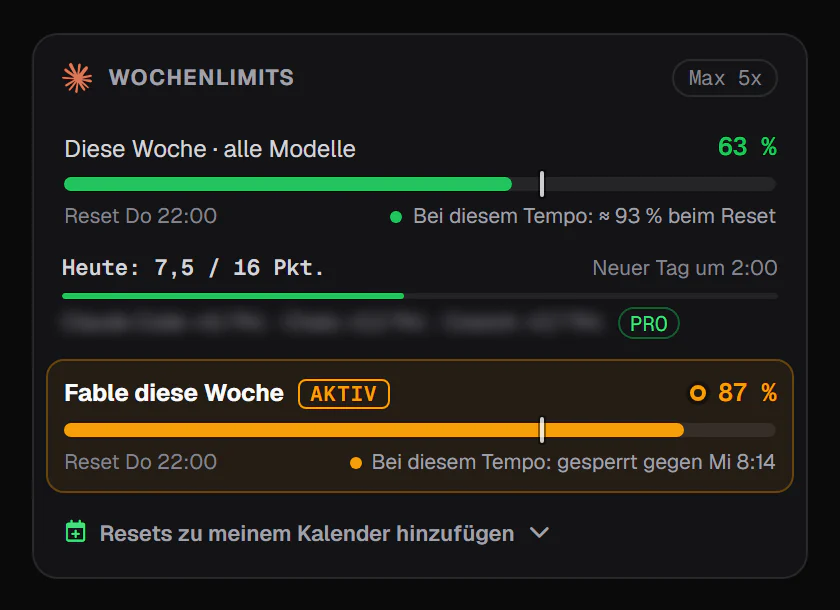
Settings > Usage is accurate, but you have to open it. UsageMeter, a free extension for Chrome, Edge and Firefox (independent, not affiliated with Anthropic), shows every limit claude.ai reports for your account, each with its reset countdown and a pace marker that says whether you are on track: the session in the composer (hover it for the rest) and the limit you choose on the toolbar icon. Its popup adds this session's tokens and how your week split between chats, Claude Code and Cowork. Alerts before a limit is full and when it comes back, and charts, come with Pro (compare plans).
FAQ
Does Claude's 5-hour limit reset at a fixed time?
No. It is a rolling window: it closes about five hours after the message that opened it, and the next one opens with your next message. Settings > Usage shows the exact time remaining. Only a limit reset refills it early: Anthropic grants them occasionally, and gave subscribers one on 22 September 2026.
Is Claude's weekly limit a rolling seven days?
No. Anthropic says the weekly limit resets at a fixed time each week assigned to your account, and that the day and time don't depend on when you started using Claude or subscribed. Settings > Usage shows your next reset under Weekly limits.
Do Claude Code and claude.ai share the same limits?
Yes. Claude on the web, Claude Desktop, the mobile apps, Cowork and Claude Code all count toward the same session and weekly limits. Claude Code can also hit an Opus or Sonnet limit that blocks only that model family, while other models keep working.
How many messages does a Claude plan give you?
Anthropic doesn't publish a number, because it depends on conversation length, attachments, model, effort and tools. It publishes multipliers instead: Pro gives at least 5x Free per session, and Max 5x or 20x Pro (Claude pricing FAQ).
Do Claude's limits change at peak times?
Anthropic said on 26 March 2026 that weekday peak hours (05:00 to 11:00 Pacific Time) make the 5-hour session drain faster on Free, Pro and Max, and it hasn't announced an end for chat. It removed that reduction for Claude Code on Pro and Max on 6 May 2026. Weekly limits were never affected.
Sources
- Anthropic, Plans and pricing: usage limits FAQ, plan prices (checked 24 September 2026)
- Anthropic help center, Usage limit best practices
- Anthropic help center, What is the Pro plan? and What is the Max plan?
- Anthropic help center, Get started with Claude (Free plan)
- Anthropic help center, Claude Fable models on your plan
- Anthropic help center, What is a limit reset?
- Anthropic help center, Manage usage credits for paid Claude plans
- Anthropic help center, How do usage and length limits work?
- Claude Code docs, Manage costs effectively and Errors: usage limits
- Anthropic, Higher usage limits for Claude and a compute deal with SpaceX (6 May 2026)
- Anthropic, Introducing Claude Opus 5.5 (22 September 2026): higher five-hour limits, one limit reset for subscribers
- Thariq (Claude Code, Anthropic), peak hours thread (26 March 2026)
- Anthropic help center, Claude Code May–August 2026 weekly limits promotion (13 May to 13 September, then +25% from 14 September)
- @claudeai, Fable 5 on Max and Team Premium (18 July 2026); @ClaudeDevs, weekly limits +25% (29 August 2026)
- Anthropic help center, Claude March 2026 usage promotion (archived copy of 31 March 2026, with the final terms)
What changed
- 24 September 2026: new guide, every fact checked against the sources above: weekly reset at a fixed weekly time, Fable ceiling, limit resets, usage credits (formerly Extra usage), the 22 September 2026 increase of five-hour limits, 2026 timeline.