How to check your Claude usage: web, app and Claude Code
Settings > Usage on claude.ai and Desktop, /usage in Claude Code, a gauge on the page: what each view shows, what it misses, and where resets appear.
To check your Claude usage, open Settings > Usage on claude.ai or in Claude Desktop: it shows your current 5-hour session and your weekly limits, each with its reset time, and your usage credits. In Claude Code, run /usage: the same plan bars, plus a breakdown of what used them on that machine. On the Free plan Anthropic documents no usage bars: Claude warns you as you approach the 5-hour limit, then tells you when it resets.
Three views, side by side
| Where | How to open it | What it shows | What it misses |
|---|---|---|---|
| claude.ai and Claude Desktop | Settings > Usage | Current session, weekly limits (all models, Fable), usage credits, limit resets | past weeks, token counts |
| Claude Code in a terminal | /usage (also /cost and /stats) | plan bars with reset times, what used them, usage-credits spend | other devices and claude.ai in the breakdown |
| Claude Code in VS Code | /usage opens Account & usage | plan bars, what used them, a Day and Week toggle | the same as the terminal |
| Claude Desktop, Code tab | the usage ring next to the model picker | context used, plan usage for the period | what used it |
Settings > Usage shows each limit with its own reset
Example: session 42%, week 63%, Fable 87%. Whichever fills first stops you.
Closest limitthe Fable limit is at 87%: that is the one to watch.
| Limit | Used | Resets |
|---|---|---|
| 5-hour session | 42% | — |
| Weekly · all models | 63% | — |
| Weekly · Fable only | 87% | — |

How to check usage on claude.ai and Claude Desktop
- Click your initials at the bottom left, then Settings, then the Usage tab. The direct address is
claude.ai/settings/usage. - Read the Plan usage limits section at the top (Usage limit best practices):
- Current session: how much of the five-hour session you have used, and the time remaining.
- Weekly limits: when your weekly limit resets, for all models and for Fable if your plan includes it.
- Usage credits: this month's spend against your monthly limit, if you turned credits on.
- Look for a Resets section: when Anthropic has given you a limit reset, it holds a Reset for free button, and the page shows the reset's expiry date if it has one (What is a limit reset?). Subscribers received one on 22 September 2026, with the launch of Claude Opus 5.5 (Anthropic).
The bars are shares of your plan's allowance. Anthropic doesn't publish that allowance in tokens, so no tool can give you an exact count of tokens left.
What the Reset for free button does
A limit reset puts either your 5-hour session or your weekly limit back to full right away, depending on the reset shown; your weekly reset day doesn't move. You can keep it for a busy day: you don't have to hit a limit to use it. It is only offered on the web and in Claude Desktop (in Settings > Usage, and on the message you get when you reach a limit), not currently in the mobile apps or in Claude Code. Once used it can't be undone, and an unused one expires on the date listed (What is a limit reset?).
How to check usage in Claude Code: /usage
/usage is the one command to remember. Anthropic's command list describes it as "session cost, plan usage limits, and activity stats", and /cost and /stats now open the same screen, /stats on its Stats tab (Claude Code commands).
/usage shows your plan bars, then what used them on this machine
Example output. The bars are your account's limits; the breakdown under them only counts this machine's history.
| Command | Shows |
|---|---|
| /usage | your plan's limits and what used them |

On a Pro, Max, Team or Enterprise plan, /usage shows (Manage costs effectively):
- plan usage bars for the session and the week, with their reset times;
- attribution: the share of recent usage that went to each skill, subagent, plugin and MCP server;
- behavior flags when something like long context or cache misses accounts for 10% or more of recent usage, each with a tip to reduce it;
- Loops: your heaviest
/loopand scheduled tasks; - a usage-credits row with this month's spend, while credits are on.
Press d or w to switch the breakdown between the last 24 hours and the last 7 days. The docs add the caveat that matters: the figures "are approximate and computed from local session history on this machine, so usage from other devices or claude.ai is not included" (Manage costs effectively).
The Session block at the top of /usage shows a dollar figure. It is an estimate at list price meant for API users: for Pro and Max subscribers it "isn't relevant for billing purposes" (Manage costs effectively).
The same numbers appear in three other places:
- VS Code:
/usageopens the Account & usage dialog, with a Day and Week toggle (VS Code docs). - Claude Desktop, Code tab: click the usage ring next to the model picker (Desktop docs).
- Your status line: scripts can read
rate_limits.five_hourandrate_limits.seven_dayon Pro and Max (status line docs).
Before a window runs out, Claude Code can also warn you with a line such as "You've used 85% of your session limit · resets 3:45pm" (Claude Code errors).
What no official view shows
- Several computers added up. Each machine's
/usagebreakdown only knows its own sessions. - A long history. Settings > Usage shows the current windows, and Claude Code deletes local session files older than 30 days by default (Manage costs effectively).
How to check Claude usage on the Free plan
Anthropic's help center describes the usage bars for Pro, Max, Team and seat-based Enterprise plans (Usage limit best practices). On Free, the session limit still resets every five hours, and "the number of messages you can send will vary based on demand" (Get started with Claude). What Anthropic documents is a warning, "Approaching 5-hour limit.", then "5-hour limit reached - resets [time]." once you are out (Troubleshoot Claude error messages).
How to read the numbers
- A percentage means little without its reset time. For example, 80% with ten minutes left is fine; 80% with four hours left means slowing down or switching model.
- A healthy weekly bar doesn't mean Fable is available. Check the Fable line under Weekly limits.
- Bars only drop at a reset, or after a limit reset. If usage climbs while you are away, something else is using your account: Claude Code, Cowork or another device.
- Claude Code keeps counting while idle. Scheduled tasks and agent teammates send requests even when you don't type (Manage costs effectively).
A weekly percentage also reads against the days left. For instance, 63% of the week used with two days to go is on track; the same 63% on day 3 would run out before the reset.
63% of the week with two days to go is on track
Example: 63% of the weekly limit used on day 5 of 7. The dashed line is a steady pace to the reset (Thu 22:00).
- Your usage
- Steady pace
- At the current rate
On trackabout 88% of the limit at the reset.
| Measure | Value |
|---|---|
| Used so far | 63% |
| Days elapsed | 5 / 7 |
| Steady pace today | 71% |
| At the reset, at this rate | 88% |
| Weekly reset | Thu 22:00 |

Why the bars move the way they do is explained in Claude usage limits explained.
How UsageMeter helps
UsageMeter is a free extension for Chrome, Edge and Firefox, independent and not affiliated with Anthropic. It reads the same usage claude.ai shows and keeps it where you work:
- in the composer: your session, with the reset time; hover it for every limit and your pace;
- on the toolbar icon: the session, the week, or whichever limit is closest;
- in the popup: the tokens used this session and your week split between chats, Claude Code and Cowork.
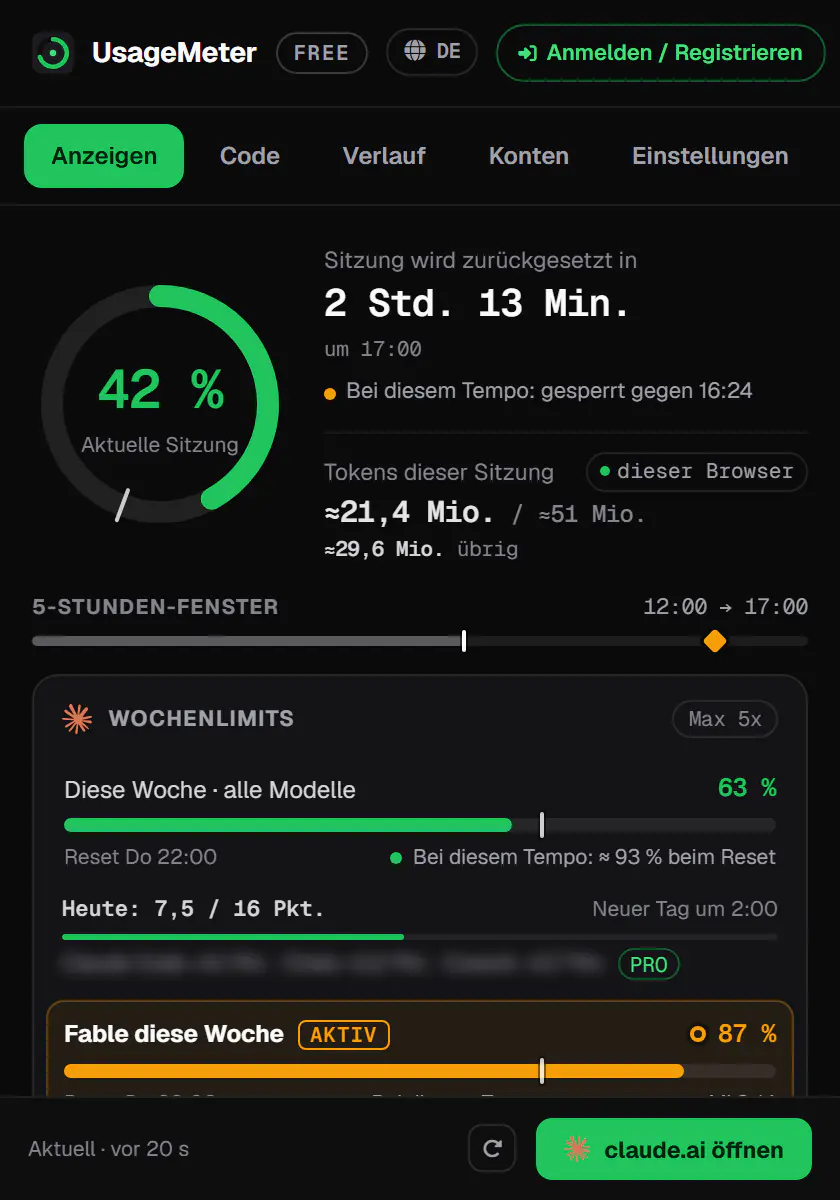
For Claude Code, UsageMeter Link, the free Windows companion, adds up the Claude Code tokens of every PC and keeps them past Claude Code's 30-day cleanup (its estimated API cost is a Pro feature).
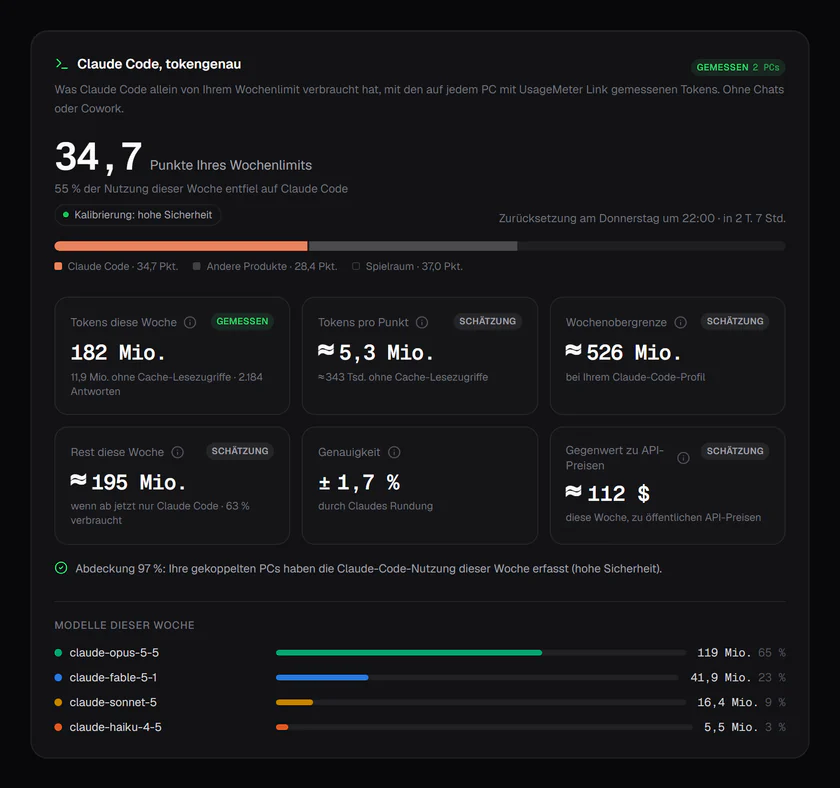
Alerts before a limit is full and when it comes back, a reminder at the reset, and charts of the last 24 hours and 7 days come with Pro (compare plans). When a limit does run out, here is what to do.
FAQ
Where is Settings > Usage on claude.ai?
Click your initials at the bottom left, choose Settings, then Usage, or open claude.ai/settings/usage directly. The same page is in Claude Desktop. It shows Current session and Weekly limits, and, when they apply to you, Usage credits and a limit reset you can use.
Does /usage in Claude Code include my claude.ai chats?
The plan bars do: they are your plan's limits, shared by every Claude surface. The breakdown under them doesn't. Anthropic says it is computed from local session history on this machine, so usage from other devices and from claude.ai is not included.
What happened to /cost and /stats in Claude Code?
They still work, as aliases: both open /usage, and /stats lands on its Stats tab. The dollar figure in the Session block is an estimate at list price meant for API users. On a Pro or Max plan it doesn't change your bill.
Can I see my Claude usage history?
Not in Settings > Usage, which shows the current windows only. In Claude Code, /usage breaks down the last 24 hours or 7 days from this machine's local history, which Claude Code deletes after 30 days by default. For a longer history across devices you need a tracker: UsageMeter's web dashboard keeps your full history with Pro.
Does checking my usage use up my limit?
Opening Settings > Usage doesn't send a message to Claude. In Claude Code, Anthropic notes that commands like /usage may send small background requests, and that background usage is typically under $0.04 per session (Manage costs effectively).
Sources
- Anthropic help center, Usage limit best practices (Settings > Usage labels)
- Anthropic help center, What is a limit reset?
- Anthropic, Introducing Claude Opus 5.5 (22 September 2026: one limit reset for subscribers)
- Anthropic help center, Troubleshoot Claude error messages
- Anthropic help center, Get started with Claude (Free plan)
- Claude Code docs, Manage costs effectively (
/usage, attribution, this-machine rule) - Claude Code docs, Commands (
/costand/statsaliases) - Claude Code docs, VS Code, Desktop, Status line and Errors
What changed
- 24 September 2026: new guide, every fact checked against the sources above: the Plan usage limits labels, limit resets (including the one subscribers received on 22 September 2026), usage credits (formerly Extra usage), the
/usagebreakdown, and/costand/statsas aliases.